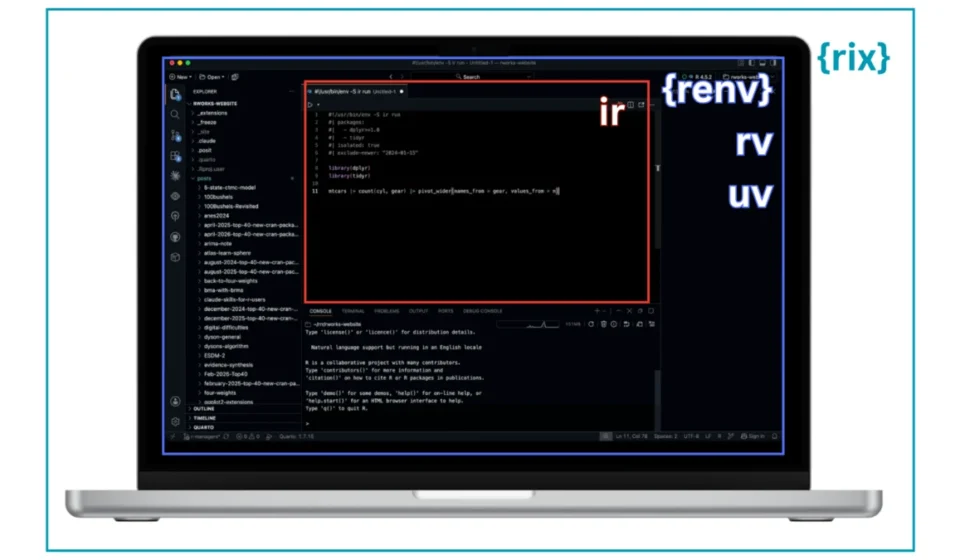
The R Ecosystem Sees an Explosion of Package and Environment Management Tools

The landscape of R development is currently experiencing a significant surge in the number and variety of package and environment management tools. This proliferation of specialized software is offering R users a wealth of new options to streamline their workflows, enhance reproducibility, and manage complex dependencies. However, this rapid expansion has also created a challenge for many users in discerning the distinctions between these tools and identifying the most suitable solution for their specific needs.
This article aims to provide a comprehensive overview of five prominent tools that have emerged or gained significant traction within the R community: renv, rix, rv, uvr, and ir. These tools, while all fundamentally addressing the challenge of tracking and isolating dependencies, operate at different conceptual levels, offering distinct approaches to environment management. Understanding these differences is crucial for R practitioners seeking to optimize their development processes and ensure the reliability of their analyses.
Context: The Growing Need for Reproducibility in Data Science
The increasing complexity of data science projects, coupled with the demand for reproducible research, has underscored the critical need for robust package and environment management. As projects grow, so does the number of packages and their versions, creating a significant risk of "dependency hell" – a state where incompatible package versions render a project unrunnable or produce inconsistent results. Furthermore, the collaborative nature of modern data science necessitates environments that can be easily shared and replicated across different machines and by different users. This has fueled the development of a diverse set of tools, each aiming to solve this problem from a unique perspective.
The recent Data Science Lab session, co-hosted by Libby Heeren and the author with Eric Nantz, highlighted this user need. The session, which showcased rix and Nix, saw an immediate influx of questions regarding how rix compares to other established and emerging tools like renv, rv, and uvr. This direct feedback from the R community served as a catalyst for this detailed exploration of the current state of R environment management.
A Comparative Overview of Key R Environment Managers
While the ultimate goal of all these tools is to manage dependencies, their methodologies and the scope of their management differ significantly. This article will delve into each tool, examining its core use case, operational methodology, and specific considerations for users.
renv: The Established Standard for Project-Local Package Management
Repo: https://github.com/rstudio/renv
Docs: https://rstudio.github.io/renv/
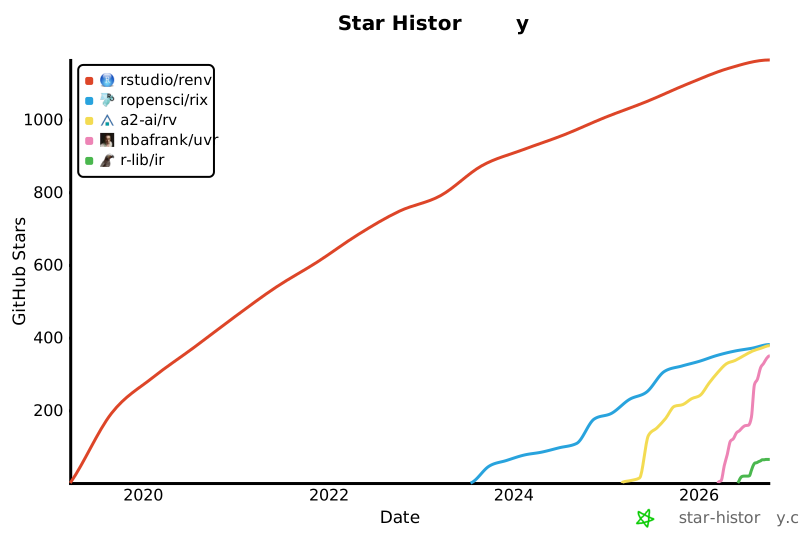
GitHub Stars: ~1.2k
Scope: Packages, R version, Environments
Use Case:
renv has become a de facto standard in the R community for managing R packages on a project-by-project basis. Developed and supported by Posit (formerly RStudio), it provides a robust mechanism for isolating project dependencies, ensuring that each R project has its own set of installed packages, independent of the global R installation or other projects. This is particularly vital for maintaining the reproducibility of analyses and for facilitating collaboration.
How to Use renv:
renv’s approach is characterized by its iterative and retrospective nature. Users typically begin by installing the necessary packages for their project using standard R installation commands. As packages are installed, renv intercepts these operations, directing them to a project-specific library. This isolation ensures that global package installations are not affected and that the project’s dependencies are self-contained.
The core of renv’s functionality lies in its ability to "snapshot" the project’s environment. After installing packages, users run renv::snapshot(). This command generates a renv.lock file, which meticulously records the exact versions of all installed R packages, along with their sources and cryptographic hashes. This lockfile serves as a reproducible blueprint for the project’s environment.
When a project needs to be shared or recreated, other users can simply run renv::restore(). This command reads the renv.lock file and automatically installs the specified package versions, ensuring an identical environment. The process can be summarized as:
- Install packages: Use
install.packages()as usual. - Project-specific library: renv automatically installs packages into a project-local library.
- Snapshot: Run
renv::snapshot()to generaterenv.lock, detailing package versions. - Restore: Run
renv::restore()to recreate the exact environment from the lockfile.
Example renv.lock File:
  "R":
    "Version": "4.4.2",
    "Repositories": [

        "Name": "CRAN",
        "URL": "https://cloud.r-project.org"

    ]
  ,
  "Packages":
    "dplyr":
      "Package": "dplyr",
      "Version": "1.1.4",
      "Source": "Repository",
      "Repository": "CRAN",
      "Hash": "fedd9d00c2944ff00a0e2696ccf048ec"
    ,
    "ggplot2":
      "Package": "ggplot2",
      "Version": "3.5.1",
      "Source": "Repository",
      "Repository": "CRAN",
      "Hash": "44c6a2f8202d5b7e6c72a95ca7ea1795"
Some Considerations:
A potential drawback of renv’s iterative approach is the possibility of introducing conflicting packages during the development process. While renv tracks R versions, it does not manage them. Users requiring different R versions for different projects will need a supplementary tool, such as rig, to handle R version installation and switching. The renv documentation provides a detailed list of caveats and best practices for users.
rix: Leveraging Nix for Comprehensive Environment Management
Repo: https://github.com/ropensci/rix
Docs: https://docs.ropensci.org/rix/
GitHub Stars: ~381
Scope: Packages, R version, Environments
Use Case:
rix operates at a higher level of abstraction by integrating with Nix, a powerful, general-purpose package manager. Instead of solely managing R packages, rix leverages Nix to snapshot and manage an entire software environment. This includes the specific version of R itself, all required R packages, and crucially, any system-level dependencies that these packages might depend on. This offers a significantly more comprehensive approach to reproducibility, extending beyond the R ecosystem to the underlying operating system components.
How to Use rix:
rix adopts a declarative and reproducible approach. Users define their desired environment upfront in a script, and Nix then constructs this environment from scratch. This contrasts with renv’s retrospective snapshotting.
The workflow typically involves:
- Define Environment: Create a small R script (e.g.,
generate_env.R) that specifies the desired R version and R packages using therix()function. - Generate Nix Configuration: Executing this R script generates a
default.nixfile. This file is a plain-text description of the complete software environment, understood by Nix. - Build Environment: The command
nix-buildis then used to construct the environment. Nix fetches all necessary dependencies and builds them into a self-contained directory within the Nix store (/nix/store). - Enter Environment: Users can then enter this reproducible environment by running
nix-shell. From within this shell, they can launch R, execute scripts, or render Quarto documents, all guaranteed to run within the precisely defined environment.
To update or add new packages, users modify the generate_env.R script, rerun it to regenerate default.nix, and then re-execute nix-build and nix-shell.
Example generate_env.R Script:
library(rix)

rix(
  r_ver = "4.4.2",
  r_pkgs = c("dplyr", "ggplot2"),
  project_path = "."
)
Some Considerations:
The primary consideration for rix is the initial hurdle of installing and learning Nix itself. Nix is a powerful but distinct package management system, and its learning curve can be steeper than traditional package managers. However, this investment is rewarded with a level of reproducibility that extends to system libraries, offering unparalleled consistency across different computing environments.
rv: A Fast, Declarative R Package Manager
Repo: https://github.com/A2-ai/rv
Docs: https://a2-ai.github.io/rv-docs/
GitHub Stars: ~378
Scope: Packages, R version, Environments
Use Case:
rv is a relatively new contender in the R package management space, developed by A2-ai and written in the Rust programming language. It aims to provide a fast and efficient solution for project-local R package management. Key features include support for multiple package repositories, per-package source control options (allowing users to specify building from source or binary), and a claimed significant speed improvement over renv for package installations, reportedly up to 20 times faster. rv is a declarative tool, meaning users define their desired packages and versions in a configuration file, and rv resolves the entire dependency graph before any installations occur.
How to Use rv:
rv operates as a standalone command-line tool, independent of R itself. Installation can be done via various methods, including Homebrew on macOS.
The typical workflow for a new project is as follows:
- Initialize Project: Use
rv initto create a new project directory, which includes essential configuration files and a project-specific library structure. - Define Dependencies: Edit the
rproject.tomlfile within the project directory to declare the required R version and the list of R packages. This file supports specifying packages directly by name, from specific repositories, or even from Git repositories. - Synchronize Environment: Run
rv syncto resolve the entire dependency graph based on therproject.tomlmanifest. rv then installs all necessary packages and their dependencies. - Lockfile Generation: Upon successful synchronization, rv creates an
rv.lockfile. This lockfile contains the exact versions of all installed packages, similar to renv’s lockfile, ensuring reproducibility.
Example rproject.toml Snippet:
r_version = "4.4.2"

# A list of packages to install and any additional configuration
# Examples:
    # "dplyr",
    # name = "dplyr", repository = "CRAN",
    # name = "dplyr", git = "https://github.com/tidyverse/dplyr.git", tag = "v1.1.4",
dependencies = [
    "dplyr",
    "ggplot2"
]
Example rv.lock File:
[[packages]]
name = "dplyr"
version = "1.1.4"
repository = "CRAN"
source = "Repository"
hash = "fedd9d00c2944ff00a0e2696ccf048ec"

[[packages]]
name = "ggplot2"
version = "3.5.1"
repository = "CRAN"
source = "Repository"
hash = "44c6a2f8202d5b7e6c72a95ca7ea1795"
Some Considerations:
rv’s declarative nature, requiring dependencies to be defined upfront, might be less accommodating for highly exploratory workflows where packages are added incrementally. Users are expected to have a clearer understanding of their project’s dependencies before synchronization. Notably, like renv, rv declares an r_version in its configuration but does not actively manage the R version itself. Users will need a separate tool like rig for R version management.
uvr: Unifying R Package and Version Management
Repo: https://github.com/nbafrank/uvr
Docs: https://nbafrank.github.io/uvr/
GitHub Stars: ~350
Scope: Packages, R version, Environments
Use Case:
uvr, developed by independent developer nbafrank, is also written in Rust and is explicitly modeled after Python’s highly regarded uv tool. Its primary innovation is the bundling of both R package management and R version management into a single, cohesive workflow. This approach aims to provide a single source of truth for a project’s environment, encompassing both the R interpreter and the necessary packages. The tool utilizes a unified lockfile, uvr.lock, to capture all environmental requirements.
How to Use uvr:
uvr is a declarative tool, similar to rv. Users define their package requirements and optionally an R version constraint within a manifest file. uvr then resolves the entire dependency graph before proceeding with installations.
The workflow typically involves:
- Installation: uvr is distributed as a standalone binary. Installation is typically achieved via a simple script provided in the repository.
- Project Initialization: A new project is initialized using
uvr init, optionally specifying an R version constraint (e.g.,uvr init --r-version ">=4.4.2"). This action creates auvr.tomlmanifest file within the project directory. - Adding Packages: Packages are added to the manifest using the
uvr addcommand. This command updates theuvr.tomlfile and triggers a re-resolution of theuvr.lockfile. uvr supports adding packages from CRAN, Bioconductor, and direct Git repositories. - Synchronization and Locking: Running
uvr syncinstalls the specified packages and R version, if required, and ensures theuvr.lockfile is up-to-date. The lockfile meticulously records the R version and the exact versions of all installed packages.
Example uvr.toml Manifest:
r-version = "4.4.2"

[[packages]]
name = "dplyr"
version = "1.1.4"
source = "cran"
hash = "fedd9d00c2944ff00a0e2696ccf048ec"

[[packages]]
name = "ggplot2"
version = "3.5.1"
source = "cran"
hash = "44c6a2f8202d5b7e6c72a95ca7ea1795"
Some Considerations:
uvr’s strength lies in its integrated approach to R version and package management. By consolidating these aspects into a single lockfile, it simplifies the process of ensuring full project reproducibility. The declarative model encourages upfront planning of dependencies, which can be beneficial for structured projects.
ir: Reproducibility for Single-File Workflows
Repo: https://github.com/r-lib/ir
Docs: https://r-lib.github.io/ir/
GitHub Stars: ~65
Scope: Packages, R version, Environments
Use Case:
ir (short for "isolated R") operates at a finer granularity than the project-level tools. It is designed for single R scripts or Quarto documents, providing a mechanism to define and manage package requirements directly within the file itself. This is particularly useful for creating highly portable R scripts or documents that can be shared and executed by others without requiring them to manually install dependencies. ir aims to make single-file workflows reproducible and easy to share, even when a full project-level environment management system might be overkill.
How to Use ir:
ir functions as a command-line tool. Its usage involves embedding metadata about package and R version requirements directly into the script or document.
The typical workflow is as follows:
- Installation:
ircan be installed using a simple shell script provided in its repository. - Define Requirements: For R scripts (
.R), requirements are specified in a header comment using#!/usr/bin/env -S ir runfollowed by#|directives for packages, isolation settings, and version constraints. For R Markdown or Quarto documents (.Rmd/.qmd), these requirements are placed within the YAML frontmatter under anir:key. - Execute or Render: The script or document can then be executed or rendered using the
ir runorir rendercommands, respectively.irintercepts these commands, resolves the specified requirements, prepares cached package libraries, and then launches R or Quarto with the necessary runtime environment.
Example Script with ir Requirements:
#!/usr/bin/env -S ir run
#| packages:
#|   - dplyr>=1.0
#|   - ggplot2
#| isolated: true
#| exclude-newer: "2025-05-15"

library(dplyr)
library(ggplot2)

mtcars |> count(cyl, gear) |> ggplot(aes(x = cyl, y = gear)) + geom_col()
Example Quarto Document with ir Requirements:
---
 My report
ir:
  packages:
    - dplyr>=1.0
    - ggplot2
  isolated: true
  exclude-newer: 2025-05-15
---
Some Considerations:
ir is the newest tool among those discussed and is intentionally focused on single-file reproducibility. It is designed to complement, rather than replace, project-level management tools like renv, rv, or uvr when a shared project environment is necessary. Its strength lies in its simplicity for self-contained scripts and documents.
The Evolving Landscape of R Tooling
The R ecosystem is continuously evolving, with new tools and approaches emerging to address the challenges of modern data science. The R tooling webpage maintained by Novica Nakov serves as a valuable resource for tracking these developments. The rapid innovation in package and environment management reflects the community’s commitment to enhancing reproducibility, efficiency, and collaboration within R development.
The tools discussed—renv, rix, rv, uvr, and ir—represent a spectrum of solutions, from established project-level management to novel integrated approaches and fine-grained single-file reproducibility. As the field matures, users are encouraged to explore these options to find the best fit for their specific workflows and project requirements. The ongoing development in this area promises an even more streamlined and robust R development experience in the future.