New Pipeflow Version 0.4.0 Revolutionizes R Pipeline Management with Enhanced Views and Performance

The R package pipeflow has released its latest version, 0.4.0, now available on CRAN, introducing a suite of powerful new features designed to streamline and enhance the management of data processing pipelines, particularly within interactive R sessions and Shiny applications. This update marks a significant step forward for developers seeking efficient, low-latency pipeline construction and manipulation, distinguishing itself from more heavy-duty, batch-oriented solutions.
Key Innovations in Pipeflow 0.4.0
At the forefront of this release is the introduction of pipeline views. This novel functionality allows users to create dynamic, filtered subsets of their existing pipelines without duplicating data or code. These views act as live references to the original pipeline, meaning any operation performed on a view—such as running steps, updating parameters, or collecting outputs—is directly reflected in the parent pipeline, but confined to the scope of the view. This capability is particularly beneficial for large, complex pipelines where isolating specific stages or topics for analysis or debugging is often necessary.
The article highlights the ease with which these views can be created using the pip_view() function. Users can filter steps based on various criteria, including tags, step names, and execution states. For instance, a developer can quickly generate a view encompassing all steps tagged with "core" or specifically select steps like "clean" and "fit" for focused execution. The flexibility extends to logical operators, allowing for either strict adherence to all specified filters (AND logic) or broader inclusion based on any matching filter (OR logic). Furthermore, the fixed = FALSE argument enables the use of regular expressions for more nuanced pattern matching of step names, providing a robust tool for complex selection scenarios.
Complementing pip_view(), the extract operator [ has been enhanced to return a pipeflow_view by default. This offers a data.table-like syntax for selecting steps, making it intuitive for R users familiar with data manipulation. Boolean filters can be directly applied within the square brackets, enabling sophisticated subsetting based on column values such as tags, step names, and execution status.
Operationalizing Pipeline Views
The practical implications of these views are substantial. When a view is executed using pip_run(), the log output clearly distinguishes between steps belonging to the view itself (marked [view]) and any upstream dependencies that needed to be run to satisfy the view’s requirements (marked [upstream]). This granular logging provides excellent clarity during execution. Crucially, after a view is run, the original pipeline’s state is updated accordingly, ensuring consistency.
The pipeflow package also introduces pip_collect(), which can be piped from a view. This allows for the efficient retrieval of results from specific subsets of the pipeline. For example, collecting all outputs related to the "core" tagged steps provides a focused summary of key processing outcomes. The developers point to the "Pipeline views" vignette for a comprehensive guide on composing these views.
Performance Enhancements and Broader Feature Set
Beyond pipeline views, version 0.4.0 brings a host of other improvements. The underlying dependency graph has been reimplemented in C++ (building on version 0.3.0), and the bookkeeping for steps and parameters has been optimized using the data.table package. These under-the-hood enhancements translate to significant performance gains, particularly crucial for pipeflow‘s intended use case of low-latency, interactive applications. The package has also reduced its external dependencies by dropping lgr and jsonlite, now relying solely on data.table and Rcpp.
The release notes indicate several other notable additions, each with its dedicated documentation:
pip_debug(): A new function to facilitate debugging of pipeline steps.pip_trace(): Provides detailed tracing information for pipeline execution.pip_param(): Enables more flexible parameter management within pipelines.pip_env(): Offers enhanced control over the R environment in which pipeline steps are executed.pip_set_env(): Allows for the explicit setting of pipeline execution environments.pip_save()/pip_load(): New functions for persisting and restoring pipeline states, adding an element of reproducibility.pip_dir(): A utility for managing pipeline directories.
Pipeflow vs. Targets: Complementary Strengths
The developers explicitly position pipeflow within the R ecosystem, drawing a clear distinction between its strengths and those of the established targets package. While targets is the de facto standard for robust, reproducible, and scalable batch processing, offering features like disk persistence, provenance tracking, and distributed computing capabilities via crew, pipeflow targets a different niche.
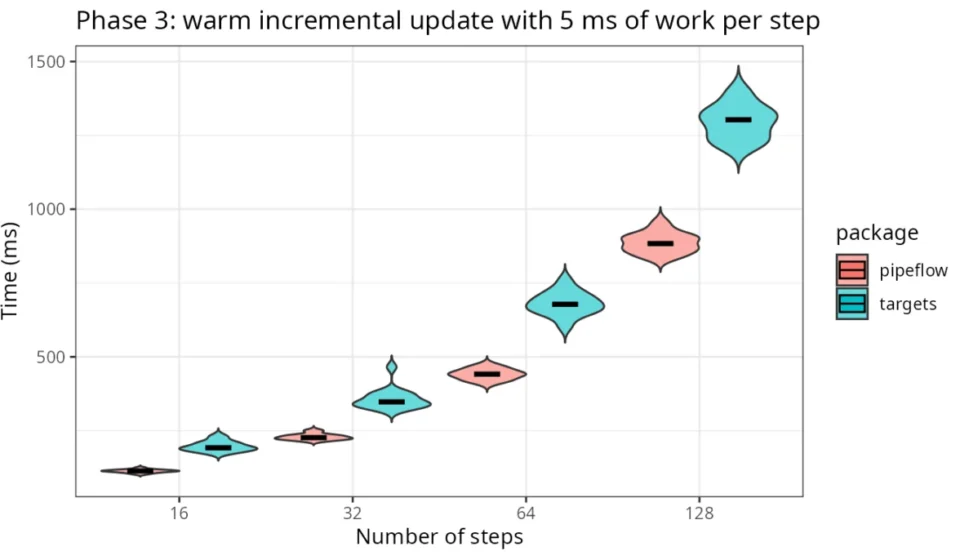
pipeflow is optimized for the interactive R session and the backend of applications like Shiny, where rapid response times and dynamic pipeline modification are paramount. The emphasis is on low latency, allowing users to build and iterate on pipelines on-the-fly without significant delays. This focus is supported by empirical benchmarks included in the release documentation.
A comparative analysis presented in the pipeflow vs targets article, and visualized with a benchmark graph, illustrates this difference. The graph depicts the time taken for incremental updates in pipelines of varying sizes, where each step performs a small amount of work (5 milliseconds in the example). Across the tested pipeline sizes, pipeflow consistently outperforms targets in terms of in-session latency. This suggests that for scenarios requiring immediate feedback and interactive development, pipeflow offers a distinct advantage. The developers advocate for a complementary approach: targets for large-scale, reproducible batch jobs, and pipeflow for interactive applications and exploratory data analysis within an R session.
Getting Started with Pipeflow 0.4.0
The release of pipeflow 0.4.0 on CRAN makes these advanced features readily accessible to the R community. Installation is straightforward:
install.packages("pipeflow")Users are encouraged to explore the comprehensive documentation available on the pipeflow website, including detailed vignettes on various functionalities and the comparison with targets. The full changelog provides an exhaustive list of all modifications in this release. Feedback, bug reports, and feature requests are welcomed on the project’s GitHub repository, indicating an active and engaged development community committed to further refining the package.
This latest version of pipeflow represents a significant advancement for R users who require efficient and responsive pipeline management, particularly in interactive and application development contexts. The introduction of pipeline views, coupled with performance optimizations and a reduced dependency footprint, positions pipeflow as a compelling tool for modern data workflow development in R.