Zotero 9 Ushers in a New Era of Document Engagement with Advanced "Read Aloud" and Enhanced Workflow Features

[City, State] – April 10, 2026 – Zotero, a widely adopted open-source reference management software, today announced the release of Zotero 9, a significant update that introduces a groundbreaking "Read Aloud" functionality, alongside a suite of enhancements designed to streamline the academic and research workflow. This release, arriving less than three months after Zotero 8, marks a pivotal moment in the software’s development, underscoring a commitment to accelerating the delivery of robust features to its user base, as outlined in their recent announcement of a faster release cycle.
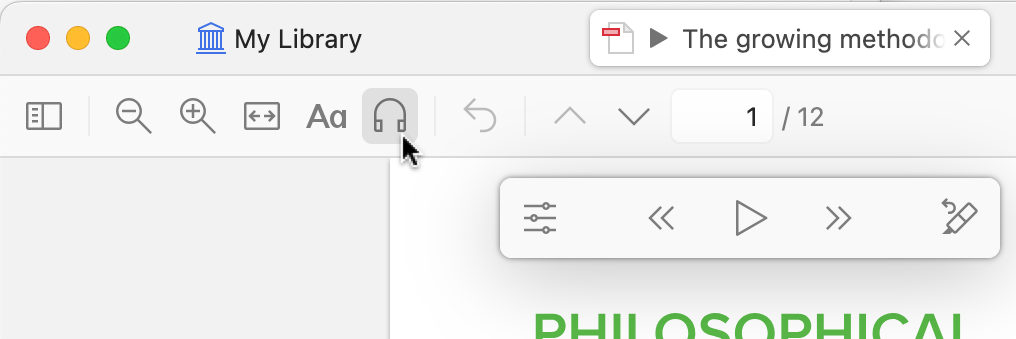
The centerpiece of Zotero 9 is the "Read Aloud" feature, a sophisticated text-to-speech engine that promises to revolutionize how researchers interact with their documents. This new capability allows users to have their PDFs, EPUBs, and webpage snapshots read aloud in high-quality, natural-sounding voices. The integration is seamless, accessible via a prominent headphones icon within Zotero’s reader toolbar.
Revolutionizing Document Consumption: The Power of "Read Aloud"
The "Read Aloud" feature is not merely a basic text-to-speech tool; it offers nuanced control and interactive capabilities. Users can navigate through documents by paragraph or sentence using intuitive keyboard shortcuts (Option/Alt-click or Option/Alt-left/right). Furthermore, the ability to initiate reading from a specific point is facilitated by a simple click in the left margin or a right-click context menu option, "Read Aloud from Here." This granular control ensures that users can pinpoint exactly where they want their reading session to begin, optimizing their study or review process.
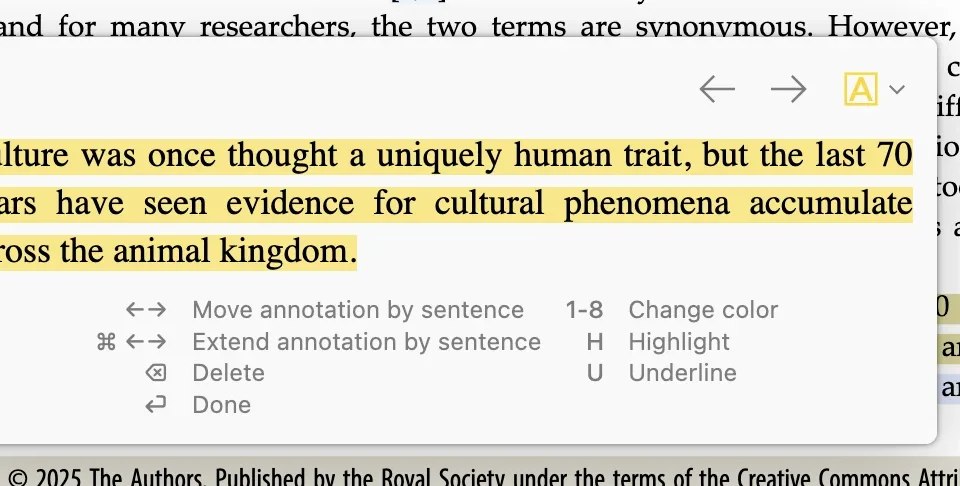
Beyond simple playback, Zotero 9 introduces an "Annotate Sentence" button, accessible via the H or U keyboard shortcuts. This function automatically highlights or underlines the last sentence that was read aloud, providing a direct link between auditory input and visual annotation. Users can then employ shortcut keys to swiftly move, expand, or delete these newly created annotations, fostering a more dynamic and efficient note-taking process. The system is designed to minimize friction, allowing for quick capture of key points as they are heard.
A crucial aspect of the "Read Aloud" functionality is its cross-device synchronization. The last reading position is meticulously saved and synced across all devices linked to a Zotero account. This means a researcher can pause reading on their desktop computer and seamlessly resume from the exact same spot on their tablet or smartphone, ensuring uninterrupted workflow regardless of their location or chosen device. This feature is particularly valuable for academics and students who frequently transition between different work environments.
The sophisticated "Zotero Voices" powering this feature necessitate an internet connection and a Zotero account. These high-quality voices are designed to mimic human speech with remarkable accuracy, enhancing comprehension and reducing listener fatigue. Zotero offers two tiers of these premium voices: Standard and Premium. Standard voices are generated on Zotero’s servers, with unlimited access for Zotero Storage subscribers and a generous 2 hours per month for free account holders.
Premium voices, sourced from external text-to-speech providers, represent the pinnacle of vocal fidelity. They are characterized by fewer errors, a more natural cadence, extensive multilingual support, and the ability to handle complex, mixed-language content. Zotero Storage subscribers receive an allocation of up to 2 hours of Premium usage monthly, with free and institutional accounts also granted a trial quota to experience the superior quality. Zotero has indicated that further details regarding monthly allocations and options for purchasing additional Premium minutes will be released in the near future, signaling a strategic approach to balancing accessibility and advanced features.
While currently exclusive to the desktop application, Zotero has confirmed that the "Read Aloud" feature is slated for release on its iOS and Android mobile applications in the coming months, promising to extend this transformative capability to on-the-go research.
"Recently Read" Collection: Instant Access to Research History
Complementing the new auditory features, Zotero 9 introduces a "Recently Read" collection, prominently displayed at the top of the collection list in each Zotero library. This dynamic collection automatically curates items with attachments that have been recently accessed, presenting them in reverse chronological order. The act of opening an attachment or advancing pages within a document immediately propels that item to the top of the "Recently Read" list, ensuring that the most pertinent research materials are always readily available.
This collection is enhanced by a "Last Read" column, which can also be integrated into other views within Zotero, offering a persistent indicator of recent activity. Furthermore, "Attachment Last Read" is now available as an advanced search condition, empowering users to precisely locate documents based on their most recent engagement. The synchronization of last-read times across devices ensures that a researcher can swiftly retrieve a file on one machine that they were actively reviewing on another, further solidifying the seamless cross-device experience.
Direct Annotation Insertion into Word Processors
A significant workflow improvement arrives with the enhanced word processor plugins in Zotero 9. The new "Add Annotation" button allows users to directly insert one or more annotations from their Zotero library into their word processing documents. This integration is coupled with active Zotero citations, which automatically generate corresponding bibliography entries, eliminating the need for manual citation management during the annotation process.
Previously, users could add annotations to Zotero notes and then insert these notes into their documents with active citations. However, Zotero 9 removes the intermediary step of creating a separate note if direct insertion into the word processor is preferred. The "Add Annotation" function opens a dedicated mode within the citation dialog, expanding attachments to reveal individual annotations. Users can browse or search for specific annotations, select one or multiple, and then seamlessly embed them into their document, complete with active citations and any associated comments. Image and ink annotations are intelligently inserted as visual elements. This streamlined approach is expected to save considerable time for researchers who frequently incorporate insights from their annotated sources into their written work.
Enhanced Group Library Management and Data Visibility
For collaborative research environments, Zotero 9 introduces valuable additions to group libraries. Users can now add "Added By" and "Modified By" columns to the item list within group libraries. This provides unprecedented transparency, allowing users to easily see and sort items based on who originally created them and who last updated them. These fields are also visible in the metadata list, alongside the standard Date Added and Date Modified, offering a comprehensive view of item provenance and evolution.
Furthermore, group administrators now have granular control over file-renaming settings for each individual group library. This feature is crucial for maintaining consistency in file naming conventions across collaborative projects, ensuring that all group members adhere to established standards and minimizing confusion arising from disparate file naming practices.
Performance and Security Upgrades
Beyond new features, Zotero 9 incorporates substantial performance enhancements. The software’s startup memory usage has been reduced by an impressive 20%. Additionally, disk access and network requests during file syncing have been drastically minimized in certain scenarios, leading to a snappier and more responsive user experience, particularly for users managing large libraries or working with extensive collections of attached files.
On macOS, Zotero now leverages a feature of the modern Apple file system that avoids redundant disk space usage when copying files. This optimization extends to Zotero’s automatic daily database backups, which can now save hundreds of megabytes or even gigabytes of local disk space, a significant benefit for users with limited storage capacity.
In a move aimed at bolstering account security, Zotero 9 transitions to a web-based login system. Users will now log in to their Zotero accounts through their web browser rather than entering credentials directly within the application. This change enables the seamless use of password managers for auto-filling login details and paves the way for the integration of two-factor authentication, which is currently in beta. This enhanced security protocol is designed to provide a robust defense against unauthorized access to user accounts and sensitive research data.
A Look at the Chronology of Zotero Development and Release
The release of Zotero 9 follows a strategic acceleration of the software’s development and release cycle. Zotero 8 was launched in early 2026, indicating a cadence of major updates approximately every three months. This accelerated pace reflects Zotero’s dedication to delivering innovative features and critical improvements to its global user community in a more timely manner.
The journey towards Zotero 9 began with internal testing and development phases, building upon the foundational improvements introduced in Zotero 8. The introduction of a faster release cycle was publicly announced by the Zotero team, signaling a shift in their development methodology to better meet user demands and adapt to the evolving needs of researchers. This strategic pivot allows for more frequent feedback integration and a quicker iteration process, ensuring that Zotero remains at the forefront of reference management technology. The development of "Read Aloud," for instance, likely involved extensive research into text-to-speech technologies, voice synthesis, and user interface design to ensure an intuitive and effective user experience.
Broader Impact and Implications for Researchers
The introduction of Zotero 9 carries significant implications for researchers across all disciplines. The "Read Aloud" feature directly addresses the growing need for accessible and flexible research tools. For individuals with visual impairments, dyslexia, or those who simply prefer an auditory learning style, this feature democratizes access to research materials. It also offers a powerful new way to engage with complex texts, allowing researchers to multitask or review content while commuting, exercising, or performing other activities. The ability to sync reading positions ensures that this flexibility does not come at the expense of continuity.
The "Recently Read" collection and enhanced word processor integration streamline the process of literature review and writing. By providing quick access to recently consulted documents and enabling direct annotation insertion, Zotero 9 reduces friction points in the research workflow, allowing scholars to focus more on analysis and synthesis rather than administrative tasks.
The security enhancements, particularly the shift to web-based login and the impending two-factor authentication, are critical in an era of increasing cybersecurity threats. Protecting sensitive research data and intellectual property is paramount, and Zotero’s proactive measures demonstrate a commitment to user data integrity.
The performance improvements, while less flashy, are crucial for the long-term usability and scalability of Zotero, especially for researchers managing vast libraries. Reduced memory usage and optimized disk access contribute to a more stable and efficient research environment, preventing the software from becoming a bottleneck in the research process.
Official Statements and Community Reaction
While specific quotes from Zotero developers regarding the launch of Zotero 9 were not provided in the initial announcement, the messaging emphasizes a strong commitment to user-centric development. The focus on delivering stable features more quickly, as highlighted by the faster release cycle, suggests a direct response to user feedback and a desire to keep pace with the rapid advancements in research methodologies and technology.
The academic and research community has historically shown strong support for Zotero’s open-source ethos and its dedication to providing powerful, free tools. Early reactions to the announcement of Zotero 9 are anticipated to be overwhelmingly positive, with particular excitement surrounding the "Read Aloud" feature. Forums and social media channels dedicated to Zotero are likely to see discussions focusing on the practical applications of the new features and suggestions for future enhancements. The introduction of Premium voices, while requiring a subscription for extensive use, also provides a pathway for users to experience cutting-edge text-to-speech technology, potentially driving further innovation in the field.
Looking Ahead: The Future of Zotero
Zotero 9 represents a significant evolution for the reference management software, pushing the boundaries of how researchers interact with their digital libraries. The introduction of advanced features like "Read Aloud" and the continued focus on performance, security, and user workflow demonstrate Zotero’s enduring commitment to serving the academic and research community. As Zotero continues to innovate under its accelerated release cycle, users can anticipate further enhancements that will undoubtedly shape the future of scholarly research and information management.
For those eager to experience the latest advancements, Zotero 9 is available for download immediately. Existing users can upgrade through Zotero’s built-in update mechanism by navigating to Help > Check for Updates.