Zotero 6 Ushers in a New Era of Research with Integrated PDF Reader and Advanced Note-Taking Capabilities

Zotero, the widely adopted open-source reference management software, has officially launched Zotero 6, marking its most significant upgrade in its history. This monumental release introduces a suite of powerful new features designed to revolutionize the research workflow, with a particular emphasis on transforming how users interact with Portable Document Format (PDF) files and digital notes. The enhancements aim to streamline the entire research lifecycle, from initial discovery to final document citation, offering researchers a more integrated and efficient experience.
The development of Zotero 6 represents a significant investment in user experience and functionality, building upon years of user feedback and the software’s established strengths in saving and organizing research materials. This release is poised to address long-standing user desires for more robust in-app tools, reducing the reliance on external applications and further consolidating Zotero’s position as an indispensable tool for academics, students, and professionals across all disciplines.
Revolutionizing PDF Interaction: The Integrated PDF Reader
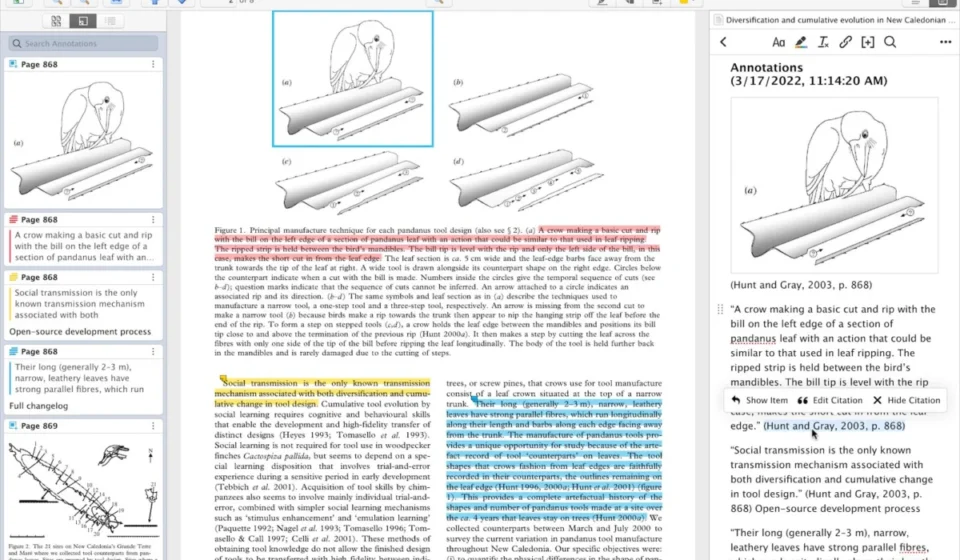
At the heart of Zotero 6 is a completely reimagined approach to handling PDF documents. Users can now read, annotate, and manage their PDF research papers directly within the Zotero application. This integrated PDF reader eliminates the need to export PDFs to external viewers, a common pain point for researchers who often juggle multiple software programs.
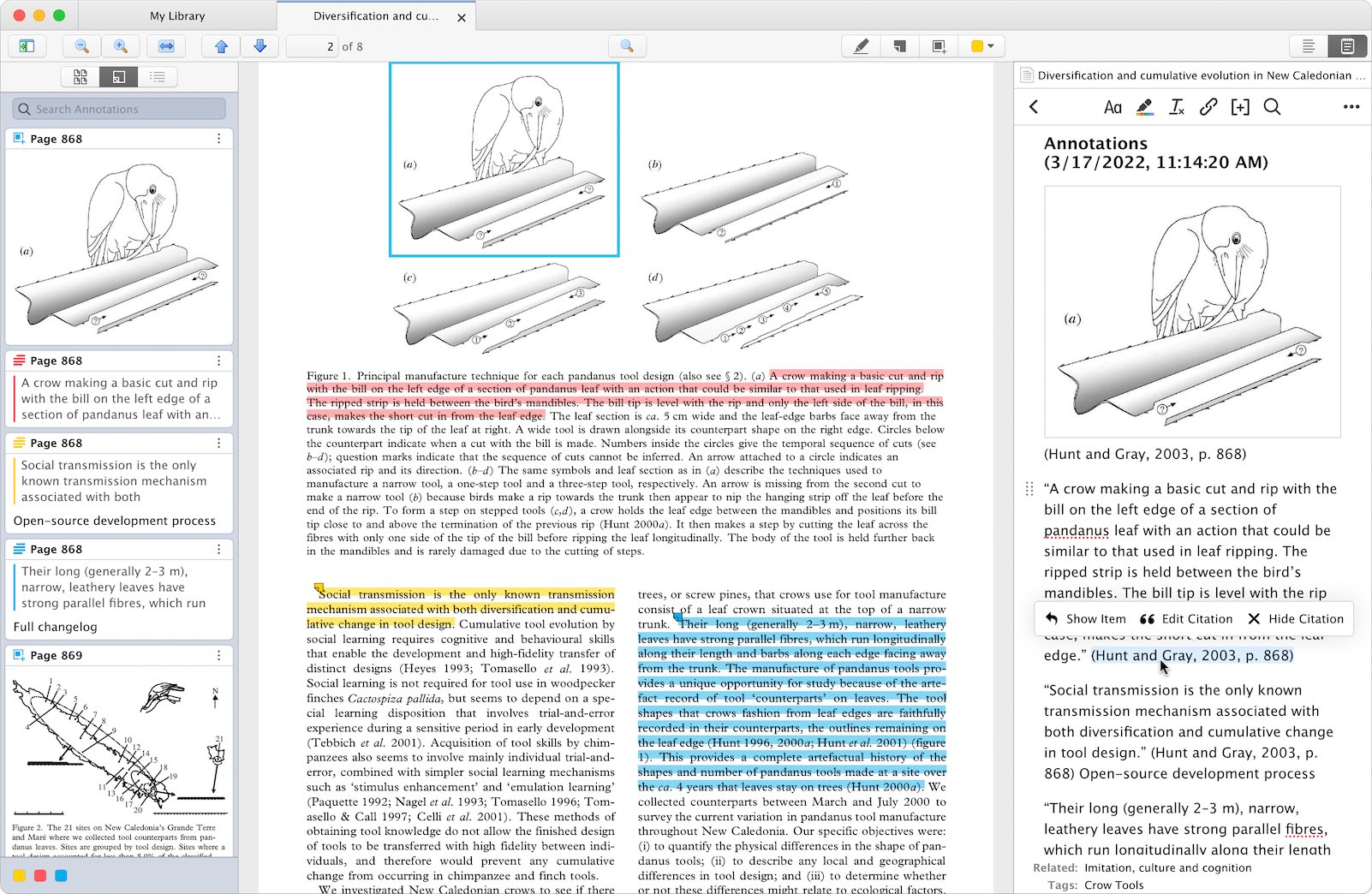
Key functionalities introduced with the new PDF reader include:
- In-line PDF Annotation: Users can now highlight text, add notes, and make markings directly on PDF documents within Zotero. This feature supports a variety of annotation types, allowing for rich engagement with research materials.
- Automatic Annotation Syncing: A critical aspect of the new PDF reader is its seamless integration with Zotero’s synchronization capabilities. Annotations made on one device are automatically updated across all synced Zotero libraries. This ensures consistency and prevents data loss, a significant improvement over manual syncing methods or reliance on third-party annotation tools. The software is designed to handle these updates without requiring users to close PDFs on other devices, a thoughtful consideration for multi-device workflows.
- Collaborative Annotations in Group Libraries: Zotero 6 extends collaborative features to PDF annotations within group libraries. This allows research teams to collectively mark up documents, share insights, and track each other’s annotations in real-time. This feature is particularly valuable for joint research projects, facilitating shared understanding and efficient feedback loops.
- Cross-Platform Synchronization with Mobile Devices: The PDF reader syncs directly with the Zotero iOS app, enabling users to annotate PDFs on their iPads or iPhones. This extends the research workflow to mobile platforms, allowing for note-taking and highlighting on the go. The app even supports ink annotations made with an Apple Pencil, catering to users who prefer a more tactile annotation experience. Furthermore, PDFs will automatically open to the last viewed page, regardless of the device used, ensuring continuity in research sessions.
This integrated PDF reader addresses a critical gap in Zotero’s previous offerings, significantly enhancing its utility as a comprehensive research management solution. Previously, users often relied on extensions like ZotFile to extract PDF annotations into Zotero notes. Zotero 6 now incorporates this functionality natively, offering a more streamlined and robust experience.
The New Note Editor: Enhanced Functionality and Integration
Complementing the new PDF reader, Zotero 6 introduces a significantly enhanced note-taking experience. The new note editor is designed for greater flexibility and deeper integration with the research workflow.
Key features of the new note editor include:
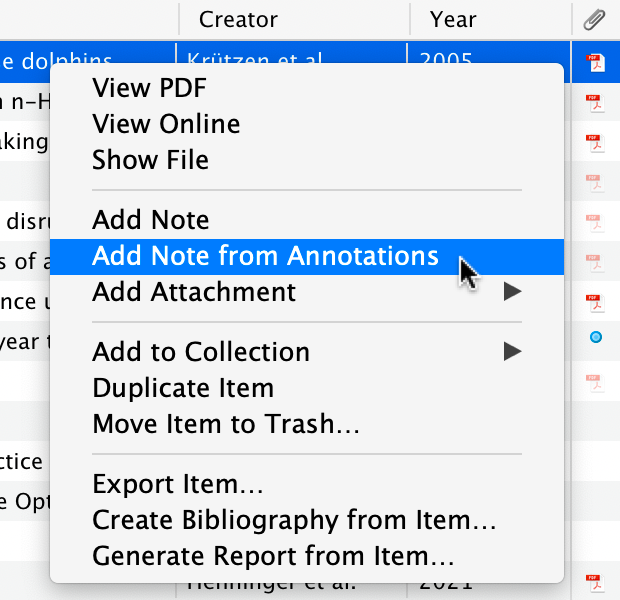
- Annotations in Notes: A groundbreaking feature allows users to quickly transfer all or selected annotations from a PDF directly into a Zotero note. These are not mere text extractions; they retain crucial context, including links back to the original PDF and page number, allowing users to easily revisit the source material. This feature facilitates the compilation of research summaries, literature reviews, and draft sections of academic papers.
- Dynamic Citation Integration: When annotations are added to notes, any citations embedded within them remain active. This means that when these notes are inserted into word processor documents using Zotero’s plugins, the citations will be automatically recognized and included in the generated bibliography. This eliminates manual citation management for annotated content and reduces the risk of errors.
- Customizable Note Templates: Zotero 6 supports note templates, enabling users to pre-define the structure and formatting of their notes. This allows for consistent organization of research insights and a personalized approach to note-taking.
- Markdown Export and Quick Copy: The note editor now features a dedicated Quick Copy setting with options for Markdown + Rich Text or raw HTML. Users can easily copy or drag notes, or even individual annotations, into external editors. This functionality includes Markdown links that point back to the original Zotero item and PDF page, preserving provenance and enabling easy navigation. This feature is particularly beneficial for researchers who utilize Markdown-based writing environments or platforms like Obsidian, Roam Research, or Logseq.
- Embedded Images in Notes: Zotero 6 now supports the embedding of images directly within notes. Users can drag and drop images from their computers or the web, and these images will sync across devices. A particularly innovative aspect is the ability to create an image annotation within the PDF reader and drag it directly into a note, creating a cited image within the user’s research documentation.
These advancements in note-taking transform Zotero from a mere reference manager into a dynamic research notebook, capable of capturing and organizing complex research findings with rich contextual information.
Broader Enhancements and User-Requested Features
Beyond the headline features of the PDF reader and note editor, Zotero 6 incorporates several other significant improvements and addresses long-standing user requests. These enhancements aim to further refine the overall user experience and cater to a diverse global user base.
- Non-English Spellchecking: Researchers working in languages other than English can now benefit from enhanced spellchecking capabilities. Zotero 6 supports the addition of over 40 dictionaries, significantly improving the accuracy and ease of writing in various languages directly within Zotero notes. This addresses a common frustration for international users and multilingual researchers.
- Improved Mendeley and Citavi Import: Zotero 6 introduces improved import functionalities for users migrating from competing reference managers. The built-in Mendeley importer now correctly imports Mendeley annotations for use within the new Zotero PDF reader. Furthermore, a new import process allows users to import their Mendeley data directly from their online library, bypassing limitations imposed by database encryption that previously hindered local imports. Similarly, the Citavi import process now includes the transfer of Citavi PDF annotations, providing a smoother transition for users of that platform. This demonstrates Zotero’s commitment to interoperability and user choice.
- Bundled Safari Extension: For Mac users running macOS Big Sur or later, the Zotero Connector for Safari is now integrated directly into the Zotero application. Users can enable this extension from the Extensions pane within Safari preferences, simplifying installation and management for Safari users.
These additions, while perhaps less prominent than the PDF reader and note editor, collectively contribute to a more robust, user-friendly, and accessible research tool.
Background and Context
The release of Zotero 6 follows a period of significant development and community engagement. Zotero, first released in 2006 by George Mason University’s Center for History and New Media, has consistently evolved as a free and open-source alternative to proprietary reference management software like EndNote and Scopus. Its open-source nature has fostered a dedicated community of developers and users who contribute to its ongoing improvement.
The development cycle for Zotero 6 has likely involved extensive beta testing and feedback incorporation. Major releases like this are typically preceded by alpha and beta testing phases, where a broader group of users can test new features, identify bugs, and provide crucial input. The introduction of a fully integrated PDF reader and an advanced note editor represents a strategic shift, aiming to centralize more research activities within the Zotero ecosystem. This move aligns with broader trends in research software towards integrated platforms that reduce the friction of switching between applications.
Implications and Analysis
The release of Zotero 6 has several significant implications for the research community:
- Enhanced Productivity: By consolidating PDF reading, annotation, and note-taking within a single application, Zotero 6 promises to significantly boost researcher productivity. The seamless integration of these tools reduces the time spent on administrative tasks and allows researchers to focus more on their core intellectual work.
- Democratization of Advanced Features: As an open-source project, Zotero offers its advanced features free of charge. The introduction of such powerful PDF annotation and note-taking capabilities, often found in paid software, makes these essential research tools more accessible to students, early-career researchers, and institutions with limited budgets.
- Strengthened Collaborative Research: The collaborative annotation features in group libraries are particularly impactful for team-based research. This fosters a more dynamic and interactive research environment, enabling shared understanding and faster progress on joint projects.
- Increased Competitiveness: Zotero 6’s feature set positions it as a formidable competitor to established commercial reference managers. The integrated PDF reader, in particular, addresses a key area where many users have sought improvement.
- Future Development Trajectory: This release signals a clear direction for Zotero’s future development, focusing on deeper integration of core research tasks. Future updates may further expand these capabilities, potentially including more advanced text analysis tools or integrations with other research platforms.
The adoption of Zotero 6 is expected to be rapid within its existing user base, given the substantial improvements offered. For researchers currently using multiple disparate tools for PDF management and note-taking, Zotero 6 presents a compelling case for consolidation. The ease of migration, particularly for Mendeley and Citavi users, further encourages this transition.

Accessing Zotero 6
Existing Zotero users can upgrade to Zotero 6 directly from within the application by navigating to Help > Check for Updates. For new users, Zotero 6 is available for download from the official Zotero website’s download page, ensuring broad accessibility to this significant upgrade.
This release represents a pivotal moment for Zotero, solidifying its reputation as a leading, innovative, and user-centric research tool that continues to empower scholars worldwide. The comprehensive integration of PDF annotation and advanced note-taking features marks a new chapter in how researchers engage with their literature and synthesize their findings.