Apple’s Latest OS Features Powering a New Wave of Indispensable Indie Apps

The recent advancements in Apple’s operating systems, particularly the integration of sophisticated AI capabilities and enhanced user interface elements, are fostering a vibrant ecosystem of innovative independent applications. Developers are rapidly leveraging these new features to create tools that are not only functional but also deeply integrated into the user’s daily workflow. This evolution is particularly evident in applications designed for smart home management, personal organization, digital content aggregation, and financial planning. A closer examination of several standout apps—Haven, Structured, Capture, Scrappy, and Fin—reveals how developers are harnessing the power of Apple’s latest technologies to deliver unparalleled utility and user experience.
Haven: Streamlining Smart Home Management with AI Integration
Haven, a utility designed for managing HomeKit and Matter pairing codes, has emerged as a crucial tool for smart home enthusiasts, particularly following its recent integration of Siri AI features. Developed by João Franco, this application, available across iPhone, iPad, Mac, and Apple Watch, addresses a common pain point for users: the hassle of storing and retrieving device setup codes. In an era where smart homes are becoming increasingly complex, with numerous devices requiring pairing, the ability to quickly access these codes is paramount. Haven offers a fast and straightforward method for safeguarding this critical information.
The core functionality of Haven revolves around its ability to store pairing codes for smart home devices. This is particularly beneficial when users need to re-pair devices, a task that can become tedious if codes are lost or misplaced. The app’s design prioritizes ease of use, allowing users to input and organize codes efficiently. This meticulous organization ensures that when a smart plug behind a couch or a lightbulb in an inaccessible location needs attention, the necessary pairing code is readily available.
A significant enhancement to Haven is its seamless integration with Siri AI. This feature allows users to retrieve pairing codes using natural language queries directed at Siri. For instance, a user can simply ask Siri for the pairing code of a specific device by its name as registered within Haven. This capability eliminates the need to open the app manually, significantly streamlining the process. The AI’s understanding of natural language queries means that users can articulate their requests conversationally, making the interaction intuitive. This functionality extends to both HomeKit and Matter codes, underscoring Haven’s commitment to supporting the broader smart home landscape.
Beyond code storage, Haven offers a comprehensive system for device tracking. The app allows users to record detailed information about each smart home device, including its installation location within the home, the specific room it occupies, its category, brand, model, serial number, protocol, power source, and current status. This depth of data management appeals directly to "HomeKit nerds" and power users who appreciate granular control and detailed record-keeping. Users can also mark devices as favorites for quick access and add supplementary notes or even photographic attachments, further enriching the device’s digital profile.
The strategic integration of Apple Intelligence is a notable aspect of Haven’s recent update. The app leverages this technology to suggest relevant tags based on existing tags, improving organization and discoverability. This AI-driven suggestion system helps maintain consistency in tagging conventions, which is vital for large and complex smart home setups.
Priced as a free download with an optional premium upgrade for unlimited pairing codes at $6.99, Haven presents an accessible solution for a wide range of users. Even for individuals who may not require the full suite of advanced tracking features, the basic functionality of naming devices, assigning them to rooms, and then retrieving their codes via Siri makes it a worthwhile investment. The application’s reliance on Siri AI for database querying perfectly aligns with the needs of the smart home community, where efficient data management is key to maintaining a smoothly functioning interconnected environment. The success of Haven highlights a growing trend of specialized utilities that address specific user pain points through intelligent software design and platform integration.
Structured: Revolutionizing Daily Planning with Visual Timelines and AI Assistance
Structured, a daily planner and to-do app, has garnered significant attention for its elegant design and innovative approach to personal organization. Having been recognized as a finalist for the 2025 iPad App of the Year Award and an Apple Design Award, Structured exemplifies how modern applications can blend aesthetic appeal with powerful functionality. The app, developed to help users manage overstuffed workdays, visualizes the user’s day on a timeline, offering a clear and intuitive overview of scheduled tasks and commitments.
The core philosophy behind Structured is to combat the common problem of overscheduling by providing a visual representation of time. This timeline-based approach allows users to see how their day is structured, enabling better time allocation and task management. The app integrates seamlessly with Apple’s Reminders app and various calendar services, consolidating all scheduled events and tasks into a single, coherent view. Furthermore, Structured supports recurring tasks and incorporates focus timers, encouraging users to maintain concentration and productivity.
The integration of Siri AI has brought new levels of convenience to Structured users. The assistant can now be used to create and edit tasks directly within the app through voice commands. This hands-free operation is invaluable for users who are on the go or multitasking. For example, a user can dictate a new task or modify an existing one without needing to physically interact with their device, thereby maintaining workflow continuity.
A particularly innovative feature currently in beta is Structured’s color prediction capability. This AI-driven tool learns from a user’s past color choices for tasks, offering intelligent suggestions for new task entries. This not only adds a touch of personalization but also helps maintain a visually consistent and organized planner, reducing the cognitive load associated with manual color selection.
Structured has also embraced Apple’s Liquid Glass design aesthetic, which lends a modern and fluid feel to the application’s interface. This update ensures that the app feels at home alongside other contemporary iOS applications, all while preserving its core principles of simple design and legibility. The app’s availability across iPhone, iPad, Mac, and Apple Watch further enhances its utility, allowing users to manage their schedules seamlessly across all their Apple devices.
The app’s success can be attributed to its user-centric design and its ability to address a widespread need for better time management. By offering a visually engaging and AI-enhanced planning experience, Structured empowers users to take control of their schedules and improve their overall productivity. Its recognition through prestigious design awards underscores its impact on the app landscape and its potential to set new standards for personal organization tools.
Scrappy: A Visually Rich Digital Scrapbook for the Modern Internet User
In an era of information overload, the need for effective tools to capture and organize digital content has never been greater. Scrappy, a digital scrapbook application developed by Steve Harris, aims to address this by providing a visually engaging platform for saving everything from notes and links to images and PDFs. Harris, also the creator of the well-regarded "Keep It" notebook and document organizer, brings his expertise in information management to Scrappy, differentiating it with a more visual and immediate user experience.
Scrappy is designed for individuals who, like the author, tend to accumulate digital "treasures"—links, articles, and images that spark curiosity and may prove useful in the future. The challenge with such digital hoarding is maintaining organization. Scrappy tackles this by offering a versatile inbox for various types of digital content, including notes, images, PDFs, links, videos, photos, and screenshots.
A distinctive feature of Scrappy is its "shelf" functionality on macOS, which provides a readily accessible area on the edge of the screen where users can drag and drop items. This immediate capture mechanism is crucial for users who frequently encounter content they wish to save while browsing or working. Across all platforms, including iPhone, iPad, and Mac, the app boasts fast search capabilities and supports smart lists, enabling users to quickly find and categorize their saved items.
The integration of Siri AI further enhances Scrappy’s utility. Users can leverage Siri to search for and open saved content, as well as to create and edit notes. This voice-driven interaction streamlines content retrieval and management, making it more accessible and efficient. The app also offers robust filtering and sorting options, allowing for sophisticated organization of digital assets.
Scrappy’s extensive library of Shortcuts actions makes it a powerful tool for automation. This feature allows users to integrate Scrappy into broader workflows, automating tasks related to content capture, organization, and retrieval. The app’s modern card interface, which utilizes Liquid Glass, presents previews of saved content in a visually appealing manner, making it easy to identify and access information at a glance.
While the App Store features numerous "bucket apps," Scrappy stands out due to its emphasis on visual presentation and its deep integration with Apple’s ecosystem. By combining efficient content capture with powerful search and AI-driven assistance, Scrappy provides a compelling solution for managing the ever-growing volume of digital information. Its ability to serve as both a quick capture tool and a well-organized digital archive makes it an indispensable asset for digital hoarders and anyone seeking better control over their online content.
Capture: An Intelligent Inbox for Digital Assets with Broad Integrations
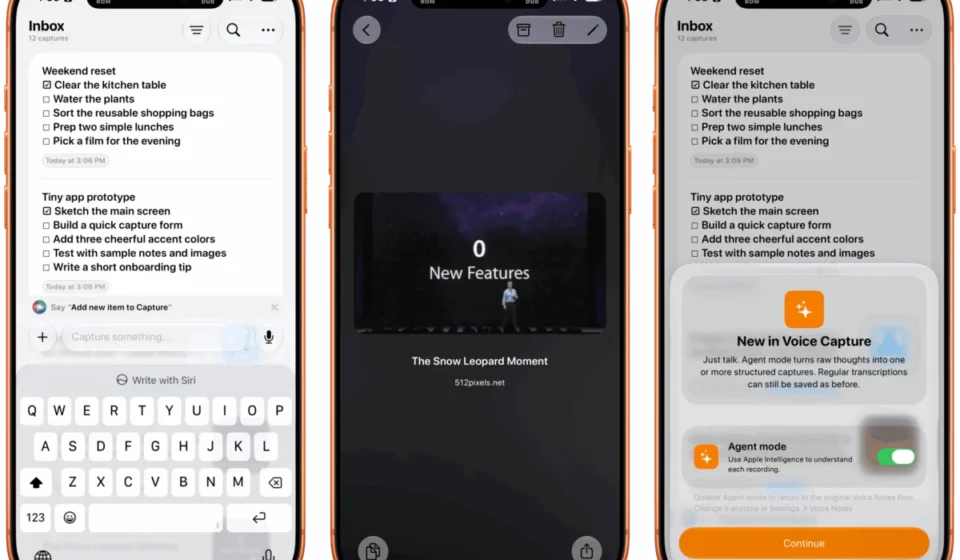
In the fast-paced digital landscape, the ability to swiftly capture and process information is a significant advantage. Capture, an application that functions as an intelligent inbox for text, links, images, files, and tasks, embodies this principle. Available across iPhone, iPad, Mac, Vision Pro, and Apple Watch, Capture is designed not just for long-term storage but primarily as a dynamic intermediary, facilitating the seamless transfer of information to nearly 60 other third-party applications.
Capture’s strength lies in its extensive library of integrations, a testament to its user-first development philosophy. This broad connectivity makes it an ideal candidate for App Intents, Apple’s framework for integrating app functionality with the system. This integration allows for effortless finding, creating, and editing of items through Siri. Users can, for example, dictate a new note, add a link to a saved article, or update a task using simple voice commands, all managed by Siri.
The app also boasts an extensive set of Shortcuts actions, positioning it as a powerful tool for cross-app automation. This allows users to build custom workflows that leverage Capture’s inbox capabilities with other applications, streamlining complex digital processes. For instance, a user could set up a shortcut to automatically save web articles captured by Scrappy into a specific project within a task management app.
A key differentiator for Capture is its embrace of Apple’s latest AI technologies. It offers creating, finding, and editing functionalities powered by Siri AI, providing a more intuitive and conversational way to interact with stored information. Furthermore, the app incorporates note transcription using Apple’s on-device model, ensuring privacy and efficiency. The inclusion of a voice-based agentic mode hints at future capabilities for more autonomous information processing.
The concept of a universal digital inbox has long been a pursuit for productivity enthusiasts. Capture’s success lies in its pragmatic approach, focusing on swift capture and effortless distribution of information. By prioritizing deep integration and leveraging on-device AI, Capture provides a secure and highly efficient solution for managing the constant flow of digital assets in today’s interconnected world. Its availability across the entire Apple device spectrum further cements its role as a central hub for digital organization.
Fin: Simplifying Personal Budgeting with AI-Powered Insights and On-Device Privacy
Fin, a personal budgeting application, rounds out this collection of indispensable indie apps, offering a streamlined approach to managing personal finances. Available on iPhone, iPad, Vision Pro, and Apple Watch, Fin prioritizes quick and easy data entry, recognizing that this is a critical factor for users aiming to adhere to their budgets. The app excels in providing a clear, colorful, and modern interface that leverages Apple’s design language to make the often-daunting task of expense tracking more approachable.
The latest iteration of Fin introduces onscreen awareness, a feature that allows users to query Siri about the content displayed on their screen. This conversational interaction can be used to quickly check balances, categorize recent transactions, or inquire about spending patterns without needing to navigate through multiple menus. This contextual understanding significantly enhances the user experience, making financial management more intuitive.
Fin also exposes transactions and accounts to Spotlight search, a fundamental macOS and iOS feature. This integration allows users to pinpoint specific financial data with unprecedented ease, whether they are searching for a particular transaction from months ago or checking the balance of a specific account. The ability to access financial information directly through Spotlight streamlines the process of reviewing and analyzing spending habits.
Furthermore, Fin empowers users with Siri integration for a range of financial management tasks. Users can search for transactions, import data from various sources, export their financial records, and add new entries using voice commands. This comprehensive Siri support reduces the friction associated with manual data entry and review, encouraging more consistent engagement with the budgeting process.
The app also features an extra-large chart widget, providing an immediate visual representation of spending trends and budget adherence. This prominent display of financial data on the home screen serves as a constant reminder and motivator for users to stay on track.
Fin’s commitment to on-device privacy is a significant selling point. By processing financial data locally, the app ensures that sensitive information remains protected, a crucial consideration for users concerned about data security. For individuals seeking a simple, private, and effective way to manage their expenses, Fin presents a compelling and well-designed solution. Its focus on ease of use, AI-enhanced interaction, and robust privacy features positions it as a leading choice in the personal finance app market.
The collective success of these five applications—Haven, Structured, Capture, Scrappy, and Fin—demonstrates the profound impact that Apple’s ongoing commitment to evolving its operating system features can have on the indie app development scene. By embracing new technologies like advanced AI, streamlined UI frameworks, and deep system integrations, developers are not just creating apps; they are building essential tools that enhance productivity, simplify complex tasks, and ultimately improve the daily lives of their users. The continued innovation in this space promises an even more integrated and intelligent digital future for Apple device owners.