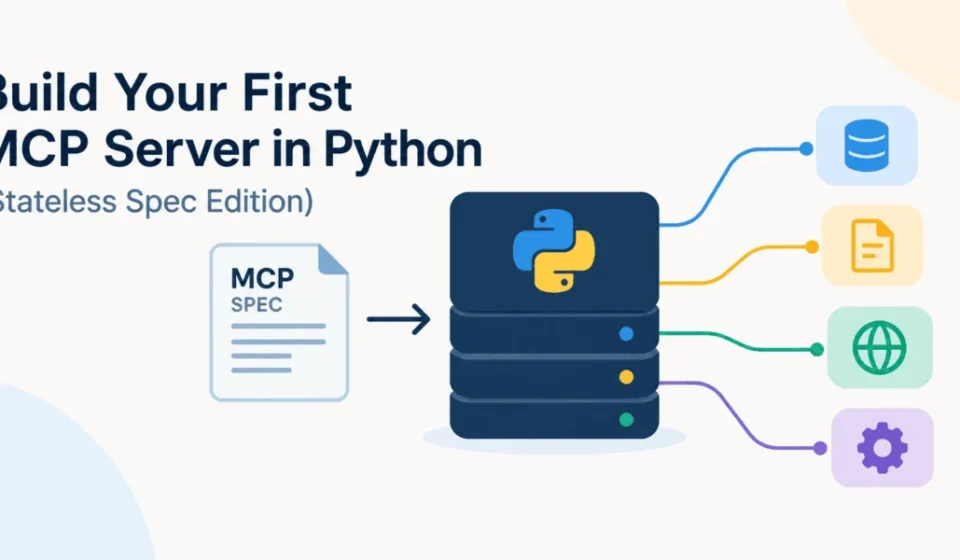

The Model Context Protocol (MCP) has undergone a significant transformation this summer with the release of its 2026-07-28 specification. This pivotal update introduces a stateless core to the protocol, fundamentally altering how clients and servers interact. Modern clients are no longer burdened with establishing explicit protocol sessions before initiating requests, and servers are liberated from relying on the Mcp-Session-Id header for routine communications. This architectural shift dramatically simplifies scaling MCP servers behind standard HTTP infrastructure. Concurrently, the official Python SDK has advanced to version 2, offering a more intuitive, higher-level MCPServer API that empowers developers to define tools, resources, and prompts using regular Python functions. This tutorial will guide you through the process of constructing a compact yet fully functional MCP server in Python, deploying it over Streamable HTTP, inspecting its capabilities locally, and subsequently connecting to it with a Python MCP client, illustrating the practical implications of these advancements.
Building a Developer Knowledge-Base Server
For this tutorial, we will develop a specialized developer knowledge-base server. This server will expose three core MCP primitives:
- Tool:
search_kb(query, limit)– This function allows models to query a knowledge base for relevant information. - Resource:
kb://articles– This represents a collection of articles accessible for direct retrieval. - Prompt:
draft_support_reply(customer_message)– This acts as a template for generating responses to customer inquiries.
A key characteristic of this server is its complete absence of user session state. Each incoming request will contain all necessary information for its processing, embodying the principles of the new stateless MCP model. Conceptually, the architecture envisions a direct flow from the Large Language Model (LLM) host to the Python MCP server, where requests are processed through the defined tools, resources, and prompts.
LLM Host
   |
   | MCP request
   v
+-----------------------+
| Python MCP Server     |
|                       |
| search_kb()           |
| kb://articles         |
| draft_support_reply() |
+-----------------------+
Project Setup and Initialization
The current Python SDK mandates Python 3.10 or a newer version. For an optimized development experience, the official documentation recommends installing the CLI extra, which provides essential development commands and the MCP Inspector workflow.
Using uv (recommended):
- Create a new project directory:
mkdir first-mcp-server cd first-mcp-server - Initialize the project environment:
uv init - Add the MCP library with CLI support:
uv add "mcp[cli]"
Using pip:
Alternatively, you can install the library directly using pip:
pip install "mcp[cli]"Your project structure can be minimal, consisting of just two primary files:
first-mcp-server/
├── server.py
└── client.py
This streamlined approach eliminates the need for extensive framework boilerplate.
Crafting Your First MCP Server with MCPServer
Begin by creating the server.py file. The foundation of your server is built using the MCPServer class from the mcp.server module. This class represents the high-level server API within the current Python SDK, suitable for most server implementations. While a lower-level Server class exists for fine-grained control over schemas, protocol metadata, or custom methods, MCPServer offers a more accessible and idiomatic Python experience.
from mcp.server import MCPServer

mcp = MCPServer(
    "Developer Support KB",
    instructions=(
        "Use the knowledge-base tools to answer support questions. "
        "Prefer retrieved KB information over guessing."
    ),
)
Next, populate the server with data. In this case, we define a list of ARTICLES, each containing an id, title, and body. This data serves as the knowledge base for our application.
ARTICLES = [

        "id": "python-env",
        "title": "Creating a Python virtual environment",
        "body": (
            "Create a virtual environment with `python -m venv .venv`, "
            "then activate it before installing dependencies."
        ),
    ,

        "id": "reset-password",
        "title": "Resetting your password",
        "body": (
            "Open Account Settings, choose Security, and select "
            "Reset Password. A verification email will be sent."
        ),
    ,

        "id": "api-rate-limit",
        "title": "Understanding API rate limits",
        "body": (
            "API rate limits restrict the number of requests allowed "
            "within a time window. Clients should retry using "
            "exponential backoff after receiving a rate-limit response."
        ),
    ,
]
This initial setup is standard Python code. The true power of MCP emerges when we expose these Python functions as part of the protocol.
Integrating MCP Tools: The search_kb Function
An MCP tool is designed to be callable by a model, enabling it to perform specific actions. We integrate the search_kb function as a tool using the @mcp.tool() decorator.
@mcp.tool()
def search_kb(query: str, limit: int = 3) -> list[dict[str, str]]:
    """Search the support knowledge base.

    Args:
        query: Words or phrases to search for.
        limit: Maximum number of articles to return.
    """
    query = query.lower()

    matches = []

    for article in ARTICLES:
        searchable_text = (
            article["title"] + " " + article["body"]
        ).lower()

        if query in searchable_text:
            matches.append(article)

    return matches[:limit]
A significant advantage of the Python SDK is its ability to automatically derive tool definitions from the Python function signature itself. There is no need to manually write JSON Schema definitions or tool manifests. The type hints (query: str, limit: int) directly translate into the MCP input schema, and default values, such as limit: int = 3, make parameters optional in the generated schema. This pattern aligns with the principle of "code as interface," where your Python function signature effectively serves as the interface definition.
Conceptually, the function signature:
def search_kb(
    query: str,
    limit: int = 3
)
is transformed into an MCP schema similar to this:
  "name": "search_kb",
  "inputSchema":
    "type": "object",
    "properties":
      "query":
        "type": "string"
      ,
      "limit":
        "type": "integer",
        "default": 3

    ,
    "required": ["query"]
This approach significantly streamlines MCP development, making it feel more akin to standard Python programming.
Exposing Data with MCP Resources
While tools represent actions a model can invoke, resources provide information that the host application can load into its context. We expose our knowledge-base articles as a resource using the @mcp.resource() decorator, assigning it the URI kb://articles.
@mcp.resource("kb://articles")
def list_articles() -> str:
    """Return the available knowledge-base articles."""
    lines = []

    for article in ARTICLES:
        lines.append(
            f"article['id']: article['title']"
        )

    return "n".join(lines)
Clients can directly access and read this resource without needing to call a specific tool. The distinction is clear: resources behave akin to GET operations, providing data, while tools are action-oriented, resembling POST operations.
Defining Reusable Prompts with MCP Prompts
The MCP protocol also supports the exposure of reusable prompt templates. This is achieved using the @mcp.prompt() decorator.
@mcp.prompt()
def draft_support_reply(customer_message: str) -> str:
    """Create a prompt for drafting a concise support response."""

    return f"""
You are a technical support assistant.

Write a concise and helpful response to this customer message:

customer_message

Use the support knowledge base when relevant.
Do not invent product policies.
""".strip()
Similar to tools, prompts are defined as simple Python functions. Unlike tools, prompts are typically initiated by the user or host application rather than being autonomously invoked by a model. The current SDK elegantly integrates tools, resources, and prompts through this unified decorator-based server interface.
At this stage, the complete server.py file appears as follows:
from mcp.server import MCPServer

mcp = MCPServer(
    "Developer Support KB",
    instructions=(
        "Use the knowledge-base tools to answer support questions. "
        "Prefer retrieved KB information over guessing."
    ),
)

ARTICLES = [

        "id": "python-env",
        "title": "Creating a Python virtual environment",
        "body": (
            "Create a virtual environment with `python -m venv .venv`, "
            "then activate it before installing dependencies."
        ),
    ,

        "id": "reset-password",
        "title": "Resetting your password",
        "body": (
            "Open Account Settings, choose Security, and select "
            "Reset Password. A verification email will be sent."
        ),
    ,

        "id": "api-rate-limit",
        "title": "Understanding API rate limits",
        "body": (
            "API rate limits restrict the number of requests allowed "
            "within a time window. Clients should retry using "
            "exponential backoff after receiving a rate-limit response."
        ),
    ,
]

@mcp.tool()
def search_kb(
    query: str,
    limit: int = 3,
) -> list[dict[str, str]]:
    """Search the support knowledge base."""

    query = query.lower()

    matches = []

    for article in ARTICLES:
        searchable_text = (
            article["title"] + " " + article["body"]
        ).lower()

        if query in searchable_text:
            matches.append(article)

    return matches[:limit]

@mcp.resource("kb://articles")
def list_articles() -> str:
    """Return the available knowledge-base articles."""

    return "n".join(
        f"article['id']: article['title']"
        for article in ARTICLES
    )

@mcp.prompt()
def draft_support_reply(
    customer_message: str,
) -> str:
    """Create a support-response prompt."""

    return f"""
You are a technical support assistant.

Write a concise and helpful response to this customer message:

customer_message

Use the support knowledge base when relevant.
Do not invent product policies.
""".strip()

if __name__ == "__main__":
    mcp.run("streamable-http")
This code block now represents a complete, network-accessible MCP application.
Development Workflow: Running in Development Mode
For development purposes, the SDK provides a convenient command-line tool.
uv run mcp dev server.pyThis command launches the server with MCP Inspector support enabled. The Inspector provides a user interface for listing and invoking your server’s tools, which is invaluable for iterative development. This loop—develop, inspect, refine—is the recommended approach for building MCP services.
Upon running the command, the terminal will output a URL for the MCP Inspector. Navigating to this URL will reveal the search_kb tool under the "Tools" section. You can then test this tool by providing input, such as a JSON object for the query and limit parameters:
"query": "rate limit"
The expected output, displayed within the Inspector, should contain the relevant article:
[

    "id": "api-rate-limit",
    "title": "Understanding API rate limits",
    "body": "API rate limits restrict ..."

]
This confirms that your MCP server is operational and correctly processing requests.
Deploying with Streamable HTTP
To run your MCP server as a production-ready HTTP service, execute the following command:
uv run python server.pyBy default, the MCP endpoint will be exposed at http://127.0.0.1:8000/mcp. The SDK’s Streamable HTTP server utilizes /mcp as its standard endpoint.
For those who prefer integrating MCP within a larger ASGI framework, you can modify the __main__ block in server.py to expose the server as a standard ASGI application:
app = mcp.streamable_http_app()This app object can then be launched using an ASGI server like Uvicorn:
uvicorn server:appThis approach is particularly beneficial when MCP services are part of a broader application built with frameworks such as FastAPI or Starlette, as streamable_http_app() returns a Starlette-compatible ASGI application.
The Impact of the Stateless MCP Update
The transition to a stateless MCP core is a significant development that warrants special attention, as many existing tutorials may still describe older, stateful protocols. Historically, an HTTP client interaction with an MCP server often involved a stateful handshake:
Client
  |
  | initialize
  v
Server
  |
  | Mcp-Session-Id
  v
Client
  |
  | later request + session id
  v
Same logical session
This stateful design necessitated multi-instance deployments that frequently required sticky routing (directing subsequent requests from the same client to the same server instance) or complex shared session infrastructure. The 2026-07-28 protocol revision fundamentally changes this paradigm.
Modern MCP requests are designed to be self-contained and independent:
Request 1
   |
   v
Server A

Request 2
   |
   v
Server C

Request 3
   |
   v
Server B
Crucially, no protocol session is required to maintain continuity between these calls. The MCP team has explicitly described this shift as a move from a bidirectional, stateful protocol core to a stateless request-response model. This architectural change significantly simplifies the implementation and management of load balancing across multiple server instances.
Developing a Python MCP Client
To validate the server’s functionality without relying on external AI applications, we can develop a dedicated Python MCP client. Create a client.py file with the following content:
import asyncio

from mcp import Client

async def main() -> None:
    async with Client(
        "http://127.0.0.1:8000/mcp"
    ) as client:

        print(
            "Protocol:",
            client.protocol_version,
        )

        tools = await client.list_tools()

        print("nAvailable tools:")

        for tool in tools.tools:
            print("-", tool.name)

        result = await client.call_tool(
            "search_kb",

                "query": "rate limit",
                "limit": 2,
            ,
        )

        print("nTool result:")

        if result.structured_content:
            print(result.structured_content)
        else:
            print(result.content)

if __name__ == "__main__":
    asyncio.run(main())
To run the client:
- In one terminal, start the server:
uv run python server.py - In a separate terminal, execute the client script:
uv run python client.py
The v2 Client directly accepts an HTTP URL and automatically handles the Streamable HTTP protocol. It also reports the negotiated protocol version, so with a current client and server pair, you should observe the modern protocol version:
Protocol: 2026-07-28

Available tools:
- search_kb

  'result': ['id': 'api-rate-limit', 'title': 'Understanding API rate limits', 'body': 'API rate limits restrict the number of requests allowed within a time window. Clients should retry using exponential backoff after receiving a rate-limit response.']
This output confirms that the client can successfully communicate with the stateless MCP server, retrieve tool information, and execute a tool call, receiving structured content as expected.
Managing Application State in a Stateless Protocol
It is crucial to understand that a "stateless protocol" does not preclude an application from maintaining its own state. Instead, it means that MCP itself no longer abstracts application state within its protocol sessions.
Consider building a shopping server as an example. Instead of relying on a protocol-level session identifier like MCP session 42 owns this basket, the recommended approach is to expose application-level state management explicitly. This can be achieved by defining tools that manage and return identifiers for stateful entities.
For instance, a create_basket tool could generate a unique basket ID:
@mcp.tool()
def create_basket() -> dict[str, str]:
    basket_id = create_new_basket()  # Assume this function creates and returns a unique ID
    return
        "basket_id": basket_id
Subsequently, other tools, such as add_item, would accept this basket_id as an explicit parameter:
@mcp.tool()
def add_item(
    basket_id: str,
    product_id: str,
) -> dict:
    return add_product(  # Assume this function adds the item to the specified basket
        basket_id,
        product_id,
    )
In this model, the LLM directly interacts with and manages the basket_id identifier, passing it explicitly in requests. This "explicit-handle" pattern is the recommended method for managing application-level state within the new stateless MCP protocol.
This represents a subtle yet significant architectural shift:
Old Idea:
Protocol remembers state.
New Idea:
Application owns state, and identifiers travel explicitly.
Scaling the Stateless Server
The stateless core of MCP becomes particularly advantageous when deploying multiple server workers. For example, when running an ASGI application with multiple workers:
uvicorn server:app --workers 4In a stateless architecture, any worker can handle an incoming MCP request because the protocol no longer mandates that a request be routed back to the specific worker that handled a previous request from the same client. This simplifies load balancing significantly:
              +--> Worker 1
Client --> LB +--> Worker 2
              +--> Worker 3
              +--> Worker 4
While advanced considerations such as multi-round-trip interactions, shared subscription events, authorization, and distributed state management require further application-level architectural planning, the fundamental execution of MCP tools is greatly simplified by the stateless protocol design.
Conclusion
The practical implications of the stateless MCP update are profound, even if the outward developer experience—decorating functions, returning data, and running the server—remains familiar. The underlying mechanics have evolved significantly. The need for explicit connection handshakes, session management, or sticky routing has been eliminated. Developers can now focus on implementing their core logic using MCPServer, ensuring that standard output is clean, and benefit from a simplified infrastructure that is inherently more scalable and easier to manage. The shift towards statelessness in MCP represents a mature evolution, aligning the protocol with modern distributed system design principles.