Zotero 9 Revolutionizes Research Workflow with Read Aloud, Enhanced Annotation, and Performance Upgrades

Zotero 9, the latest significant update to the widely adopted open-source reference management software, has been officially released, ushering in a transformative era for researchers and academics. This release, arriving less than three months after Zotero 8, marks a significant acceleration in the software’s development cycle, underscoring a commitment to delivering robust new features to users more rapidly. The headline innovation in Zotero 9 is the introduction of a sophisticated "Read Aloud" functionality, poised to redefine how users interact with their research materials, complemented by a suite of other enhancements designed to streamline the entire research workflow.
The accelerated release schedule for Zotero 9 follows the project’s announcement of a faster release cycle, a strategic shift aimed at improving user experience and feature accessibility. This rapid development pace is a testament to the Zotero team’s dedication to evolving the platform in response to user needs and technological advancements.
Introducing "Read Aloud": A New Dimension to Document Engagement
At the forefront of Zotero 9’s advancements is the "Read Aloud" feature, a groundbreaking addition that allows users to have their documents read to them using high-quality, natural-sounding synthetic voices. This capability extends across a variety of document formats, including Portable Document Format (PDF) files, Electronic Publication (EPUB) ebooks, and webpage snapshots, offering a versatile solution for auditory learning and content consumption.
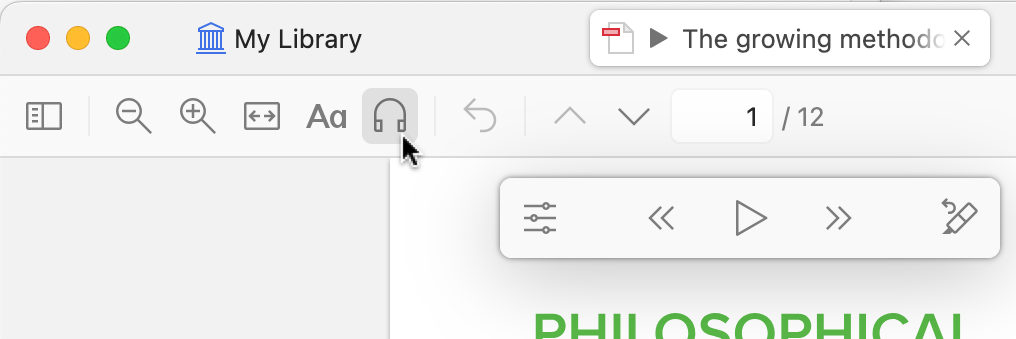
To initiate the "Read Aloud" function, users simply need to locate and click the intuitive headphones icon within the Zotero reader toolbar. This immediate accessibility ensures that the feature can be seamlessly integrated into existing research habits. Once active, the listening experience is further refined with advanced navigation controls. Users can efficiently skip forward or backward by entire paragraphs or individual sentences, utilizing keyboard shortcuts (Option/Alt-click or Option/Alt-left/right on macOS and Windows respectively) for precise control. Furthermore, the ability to initiate reading from a specific point is made effortless: a simple click in the left margin or a right-click context menu option labeled "Read Aloud from Here" allows users to jump directly to their desired section.
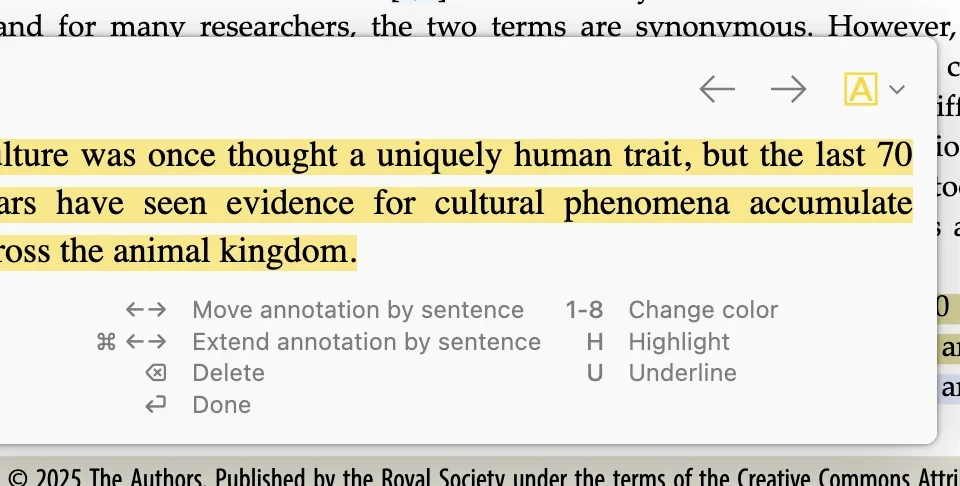
The integration of annotation tools within the "Read Aloud" experience is particularly noteworthy. A dedicated "Annotate Sentence" button, accessible via keyboard shortcuts (H or U), automatically highlights or underlines the last sentence that was read aloud. This immediate visual cue facilitates focused engagement with the content and simplifies the process of marking key passages. Users can further leverage shortcut keys to swiftly move, expand, or delete these newly created annotations, fostering a dynamic and interactive approach to note-taking.
A key aspect of the "Read Aloud" functionality is its seamless cross-device synchronization. The software intelligently saves the user’s last reading position, ensuring that individuals can effortlessly transition between different devices and pick up precisely where they left off. This feature is particularly beneficial for researchers who utilize multiple platforms throughout their day, from desktop computers to mobile devices.
The "Read Aloud" feature necessitates an internet connection and a Zotero account to access the premium, high-fidelity Zotero Voices. These advanced voices, powered by sophisticated text-to-speech engines, are designed to minimize errors and deliver a remarkably natural auditory experience. Users opting for offline usage can still leverage the system-provided text-to-speech voices, though the quality may be noticeably reduced.
Zotero offers two tiers of Zotero Voices: Standard and Premium. Standard voices are processed on Zotero’s servers, providing unlimited usage for Zotero Storage subscribers and a generous two hours per month for free account holders. Premium voices represent the pinnacle of text-to-speech technology, sourced from external providers. These voices boast superior accuracy, enhanced naturalness, broader language support, and the capability to handle multilingual texts with greater proficiency. Individual Zotero Storage subscribers receive an allocation of up to two hours of Premium voice usage monthly, with free and institutional accounts also receiving a limited quota to explore these advanced capabilities. Zotero plans to provide further details on monthly allocations and options for acquiring additional Premium minutes in the near future. Currently, all subscribers are encouraged to request supplementary Premium minutes at no cost.
While "Read Aloud" is presently exclusive to the desktop application, Zotero has indicated plans to extend this functionality to its iOS and Android mobile applications in the coming months, further broadening its accessibility.
"Recently Read": Effortless Retrieval of Research Materials
Complementing the immersive "Read Aloud" feature, Zotero 9 introduces a "Recently Read" collection. This dynamic collection, strategically placed at the top of the library’s collections list, automatically surfaces items with attachments that the user has recently engaged with, ordered from most to least recent. The act of opening an attachment or navigating through pages within a document will automatically refresh the item’s position at the top of this list, ensuring that the most relevant research is always readily available.
The "Recently Read" collection also incorporates a "Last Read" column, a valuable piece of metadata that can be added to other views within Zotero. Furthermore, "Attachment Last Read" is now available as a condition within Zotero’s Advanced Search functionality, empowering users to precisely locate documents based on their last interaction time. Crucially, this last-read timestamp synchronizes across devices, enabling users to quickly find a file on one device that they may have been reviewing on another. This feature significantly reduces the time spent searching for previously accessed materials, a common frustration in academic research.
Direct Annotation Insertion into Word Processors
A significant enhancement for users who integrate Zotero with their writing process comes in the form of direct annotation insertion into word processor documents. The existing word processor plugins have been updated to include a new "Add Annotation" button. This feature allows users to seamlessly insert one or more annotations directly into their active document, complete with active Zotero citations that automatically generate corresponding bibliography entries.
Previously, annotations could be added to Zotero notes, which could then be inserted into documents with active citations. However, the "Add Annotation" button eliminates the need for this intermediate step, allowing for a more direct and efficient workflow when working within word processors.
Upon activating the "Add Annotation" button, the citation dialog transforms into a new mode. This mode expands attachments to reveal individual annotations within them. Users can then browse or search for specific annotations, select one or multiple, and insert them into their document. These inserted annotations are accompanied by active citations and any associated comments previously added by the user. Image and ink-based annotations are intelligently inserted as image files, preserving their visual integrity. This streamlined process significantly accelerates the integration of research findings and supporting evidence into written works.
Enhanced Group Library Management: "Added By" and "Modified By" Fields
For collaborative research environments, Zotero 9 introduces "Added By" and "Modified By" columns to group libraries. This new functionality allows users to view and sort items based on who created them and who last updated them. This transparency is invaluable in group settings, enabling better tracking of contributions and facilitating more efficient project management. These fields are also visible within the metadata list, alongside the standard "Date Added" and "Date Modified" fields, providing a comprehensive overview of item provenance.
Per-Group File Renaming Settings for Enhanced Consistency
Group administrators now have granular control over file-renaming settings for each individual group library. This empowers administrators to enforce consistent file naming conventions across all members of a group, thereby reducing confusion and improving the organization of shared research materials. This feature is particularly beneficial for large research teams or institutions where standardized data management is crucial.
Significant Performance Improvements Under the Hood
Beyond new features, Zotero 9 boasts substantial performance enhancements. The development team has focused on optimizing resource utilization, resulting in a notable reduction in startup memory usage by approximately 20%. Furthermore, Zotero 9 significantly minimizes disk access and network requests during file syncing in various scenarios, leading to a more responsive and efficient user experience, especially for users with large libraries or slower network connections.
On macOS, Zotero now leverages a feature of the modern Apple file system. This allows Zotero to avoid duplicating files when copying them, a practice that can lead to significant savings in local disk space. This optimization extends to Zotero’s automatic daily database backups, potentially freeing up hundreds of megabytes or even gigabytes of storage on a user’s hard drive.
Web-Based Login Enhances Security and Usability
A notable shift in Zotero 9 is the implementation of web-based login for Zotero accounts. Users will now authenticate through their web browser rather than entering credentials directly within the application. This change offers several key advantages. Firstly, it enables seamless integration with password managers, allowing for automatic credential filling and simplifying the login process. More importantly, this move paves the way for enhanced security measures, including the forthcoming integration of two-factor authentication (currently in beta), which will significantly bolster the security of users’ Zotero accounts against unauthorized access.
A Commitment to Continuous Improvement
The release of Zotero 9, with its ambitious feature set and performance optimizations, underscores the project’s ongoing commitment to providing researchers with a powerful, free, and open-source tool. The accelerated development cycle, exemplified by the rapid succession of Zotero 8 and Zotero 9, signals a proactive approach to innovation and user satisfaction. The full spectrum of changes, including numerous smaller bug fixes and usability improvements, can be found in the comprehensive changelog available on the Zotero website.
Accessing Zotero 9
For existing Zotero users, upgrading to version 9 is a straightforward process. The software can be updated from within the application by navigating to "Help" and then selecting "Check for Updates." New users interested in experiencing the advanced capabilities of Zotero 9 can download the latest version directly from the Zotero website. This release continues Zotero’s mission to democratize access to robust research tools, empowering scholars across disciplines to manage, cite, and share their work more effectively than ever before.