IOS 27.2: A Deep Dive into Apple’s Latest iPhone Update, Packed with Health Enhancements, AI Expansions, and UI Tweaks

The landscape of mobile operating systems is in constant flux, with manufacturers striving to deliver enhanced user experiences through iterative updates. Apple, a perennial leader in this arena, is poised to release iOS 27.2, a significant update that builds upon the foundation laid by iOS 27. While the initial rollout of iOS 27 may have presented some users with a learning curve, and the subsequent iOS 27.0.1 patch addressed immediate concerns, iOS 27.2 promises a more refined and feature-rich experience, particularly for users invested in their health and well-being. This forthcoming update, currently undergoing beta testing, introduces a compelling array of new functionalities and subtle yet impactful interface adjustments, signaling Apple’s continued commitment to innovation across its ecosystem.
The journey to iOS 27.2 began with the anticipation surrounding iOS 27, which aimed to redefine user interaction with iPhones. However, as is often the case with major software releases, the initial deployment of iOS 27 was met with a spectrum of user feedback. Some users embraced the new features with enthusiasm, while others encountered minor bugs or found certain aspects of the interface less intuitive. The subsequent release of iOS 27.0.1 served as a crucial step in stabilizing the operating system, addressing critical issues that arose post-launch. This proactive approach underscores Apple’s dedication to ensuring a robust and reliable user experience. Now, with iOS 27.2 on the horizon, the company is set to introduce a wave of enhancements that not only address user feedback but also push the boundaries of what an iPhone can do, especially in the realm of personal health and integrated AI capabilities.
For those eager to experience these advancements ahead of the public release, Apple’s public beta program offers an avenue to explore the new features. By enrolling an iPhone in the beta program, users can gain early access to iOS 27.2. However, it is imperative for participants to understand that beta software, by its nature, carries inherent risks. Potential users are strongly advised to create comprehensive backups of all critical data before proceeding with the installation of any beta version to mitigate the possibility of data loss. This precautionary measure is a standard best practice in the software development lifecycle, ensuring that even in the event of unforeseen issues, user data remains secure.
iOS 27.2’s Comprehensive Health App Overhaul
Perhaps the most transformative aspect of iOS 27.2 is the radical reimagining of the Health app. This substantial overhaul represents a significant departure from previous iterations, aiming to consolidate and elevate the user’s health data within a more accessible and insightful framework. Fitness enthusiasts, in particular, are likely to find themselves impressed by the breadth and depth of the new features.
One of the most noticeable changes is the integration of Fitness rings directly into the Health app. Previously, these visual representations of daily activity goals were confined to the dedicated Fitness app. Their migration to the Health app signifies a move towards a more unified health dashboard, allowing users to view their activity metrics alongside a broader spectrum of health data. This consolidation promises a more holistic understanding of one’s well-being.
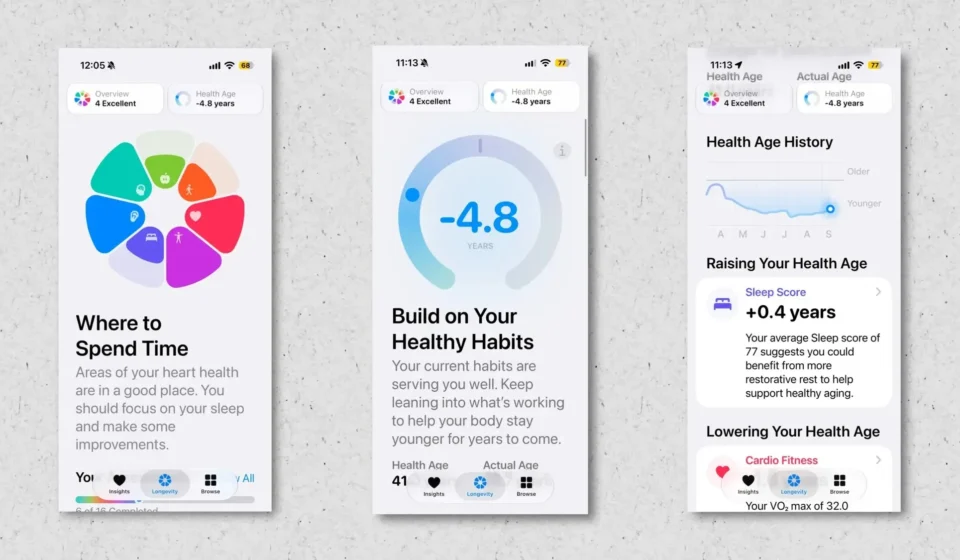
Beyond activity tracking, iOS 27.2 introduces a groundbreaking "Longevity" tab. This new section is designed to provide users with profound insights into key aspects of their long-term health. It delves into critical areas such as mental well-being, nutrition, daily movement patterns, cardiovascular health, metabolic function, sleep quality, and hearing health. By aggregating data from various sources and presenting it in an easily digestible format, the Longevity tab empowers users to make informed decisions about their lifestyle choices and proactively manage their health.
Complementing the Longevity tab are new assessments designed to analyze a user’s current overall health status and identify areas for potential improvement. A particularly noteworthy addition is the "Health Age" feature. This innovative tool aims to provide users with a personalized assessment of their biological age, offering a more nuanced perspective on their health than chronological age alone. By understanding their Health Age, users can gain a clearer picture of how their lifestyle impacts their physical condition and identify specific areas where interventions might yield significant benefits.

In a move that blurs the lines between passive tracking and active engagement, iOS 27.2 also enables the iPhone’s camera to monitor exercise routines. This advanced functionality allows the device to assess and rate a user’s fitness across various categories, including flexibility, balance, VO2max, and strength. This feature has the potential to revolutionize at-home fitness, offering personalized feedback and guidance that was previously only available through professional trainers. The ability to receive objective assessments of form and performance directly from the iPhone could lead to more effective and safer workout regimens for millions of users.
This extensive revamp of the Health app marks the most significant evolution in its history. Senior Health Editor at Lifehacker, Beth Skwarecki, has been an early proponent of these changes, highlighting the new step count that now prominently appears at the top of both the Health and Fitness apps as a particularly welcome addition for its immediate visibility and utility. Her in-depth analysis, available through a dedicated Lifehacker guide, offers further insights into the nuanced benefits of this extensive update.
iOS 27.2 Enhances "Call Context" with Anniversary Alerts
Apple Intelligence, the company’s ambitious foray into artificial intelligence, continues to find practical applications within the iOS ecosystem. "Call Context," a feature introduced to leverage Apple Intelligence, has proven to be an exceptionally useful tool for streamlining communication. When a user initiates a call to a business, Call Context intelligently scans the device for relevant information. If it identifies a connection between the phone number and a business for which the user has pertinent details stored on their device, it proactively fetches and displays that information on the call screen. A prime example is calling an airline’s customer service; Call Context can instantly present the user’s flight number by accessing itinerary details found within their email correspondence.
With the release of iOS 27.2, the capabilities of Call Context are being expanded to include anniversary alerts. If a user is on a phone call with an individual for whom they have a saved anniversary, such as a birthday or a significant personal milestone, this alert will now appear on the screen. This thoughtful addition serves as a gentle reminder, potentially preventing users from inadvertently overlooking important occasions when speaking with friends or family. While some might view this as technology aiding in social etiquette, it undeniably offers a practical safeguard against forgetfulness in our increasingly busy lives.
FaceTime Gains ASL Support, Boosting Accessibility
In line with Apple’s ongoing commitment to accessibility, a significant enhancement is coming to FaceTime in iOS 27.2. Building upon a previous announcement of new accessibility features, Apple revealed plans to introduce an API that facilitates the inclusion of human interpreters in video calls. This feature, which did not make its debut with the initial iOS 27 release, is now slated for deployment with this upcoming update. The integration of ASL (American Sign Language) support directly within FaceTime promises to make video communication substantially more inclusive for the deaf and hard-of-hearing community. This development represents a crucial step forward in digital communication, ensuring that users can connect more effectively regardless of their communication needs.
Apple TV Profiles Expand to iPhone and iPad
The Apple TV app is set to receive a significant user experience enhancement with the introduction of profiles in iOS 27.2. Users who own an Apple TV are already familiar with the convenience of setting up individual profiles, which allow for personalized viewing experiences. This functionality is now extending to the Apple TV app on iPhones and iPads, as highlighted by MacRumors.
This expansion means that multiple users can now tailor their Apple TV experience on a single mobile device. For families who share an iPad, for instance, each member can switch to their respective Apple TV profile when it’s their turn to watch content. This ensures that recommendations, watchlists, and viewing history remain distinct for each user, offering a more personalized and organized entertainment experience across devices. While this is a welcome addition, the broader desire for system-level profiles that extend across all applications remains a point of anticipation for many Apple users.
Siri AI Expands to Multiple New Languages
At its initial launch, Siri AI, Apple’s advanced conversational AI assistant, was exclusively available in English. However, iOS 27.2 marks a pivotal moment in its global rollout, as Apple is significantly expanding the language support for Siri AI. According to reports from MacRumors, this upcoming update will enable users to interact with Siri AI in French, Japanese, Korean, Portuguese, and Spanish. This multilingual expansion is a critical step in making the powerful capabilities of Siri AI accessible to a much larger global audience, fostering more natural and intuitive interactions with Apple devices worldwide. The integration of these languages signifies a substantial investment in localization and a commitment to providing a personalized AI experience across diverse linguistic communities.

iOS 27.2 Introduces Subtle yet Impactful UI Refinements
Beyond the headline-grabbing feature additions, iOS 27.2 also incorporates a series of subtle yet impactful user interface (UI) adjustments. These refinements, while not as transformative as the Health app overhaul or AI expansions, contribute to a more polished and user-friendly experience.
One notable area of refinement is the Music app. Apple appears to be toning down some of the more prominent red accents, opting instead for a more understated black aesthetic for certain buttons and icons. This includes key controls like the Play and Shuffle buttons, as well as icons within the Library sections. This design shift could lead to a cleaner and less visually overwhelming interface for music lovers.
In the Clock app, a small but noticeable change has been made to the display of "AM" and "PM" indicators when setting alarms. These markers are now rendered in a smaller font size relative to the time itself, potentially improving clarity and visual hierarchy within the alarm setting interface.
The Podcasts app also sees a minor nomenclature adjustment. The "Up Next" feature has been renamed to "New Episodes." This change, while seemingly small, may offer a touch more clarity and directness in how users navigate upcoming podcast content.
Finally, in the realm of Siri interactions, the setting previously labeled "App Access" has been updated to "Excluded Apps." Furthermore, this updated setting now offers the enhanced functionality of allowing users to exclude multiple apps from Siri’s purview simultaneously. This provides users with greater control over which applications Siri can interact with, allowing for a more customized and privacy-conscious experience.
These UI tweaks, though minor individually, collectively contribute to a more refined and cohesive user experience across the iOS 27.2 ecosystem. They demonstrate Apple’s continued attention to detail in optimizing the visual presentation and functional clarity of its operating system. The rollout of iOS 27.2 is anticipated to further solidify Apple’s position as a leader in mobile technology, offering users a compelling blend of advanced features, intelligent capabilities, and a thoughtfully designed interface.