Zotero 10 Revolutionizes Research Management with Advanced Search, Smarter Reading Tools, and Enhanced Workflow Features

Zotero, the widely-used free and open-source reference management software, has officially launched Zotero 10, ushering in a significant wave of enhancements designed to empower researchers, academics, and students. This latest iteration introduces a suite of powerful new features focused on improving library management, refining the research workflow, and significantly upgrading the user experience, particularly for those working with PDF documents. Key among the advancements are a dramatically more sophisticated advanced search capability, an overhauled Read Aloud function, and an innovative new Reading Mode for PDFs. The release, announced on August 17th, 2026, by Dan Stillman, represents a substantial leap forward in Zotero’s ongoing mission to streamline the process of collecting, organizing, citing, and sharing research.
Advanced Search Capabilities Reach New Depths
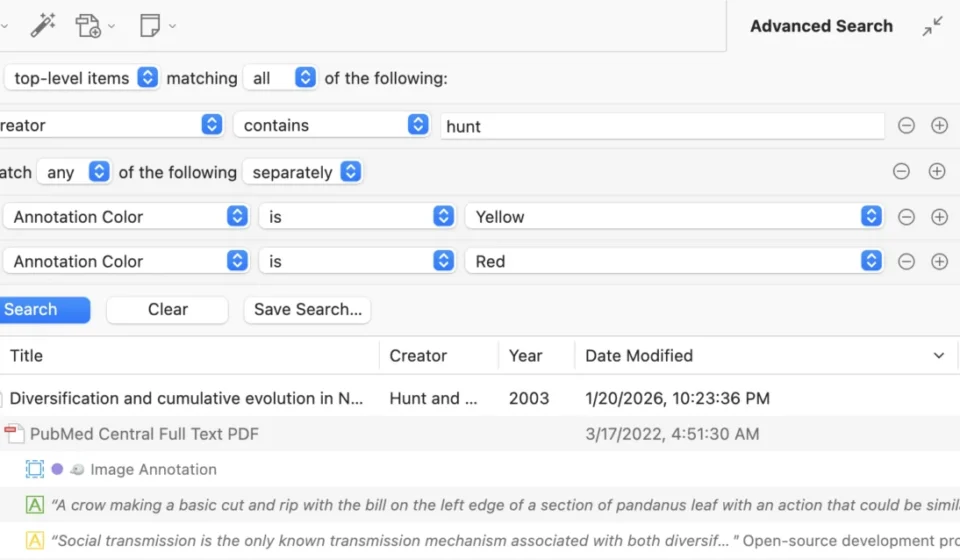
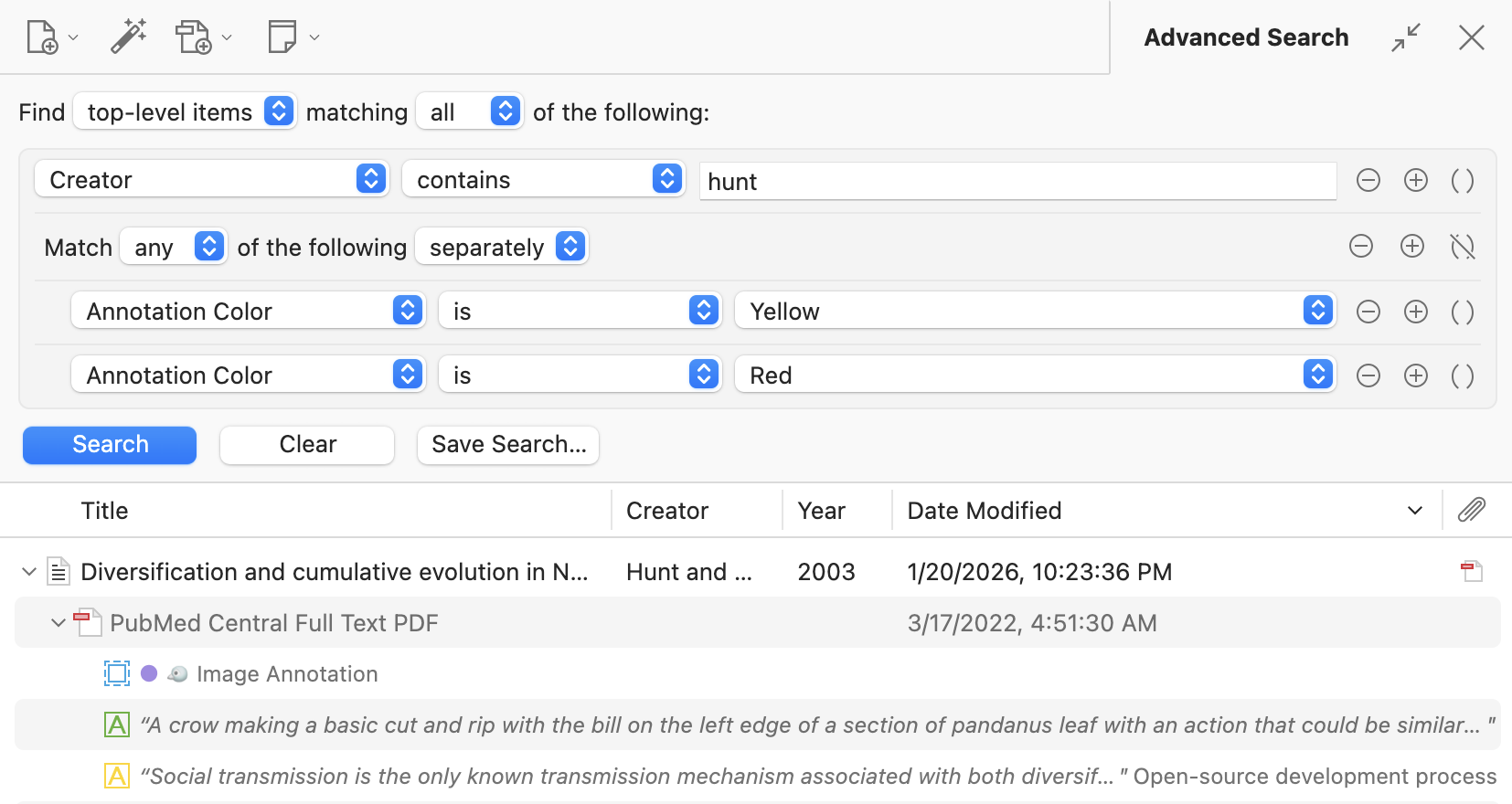
At the forefront of Zotero 10’s new offerings is a significantly enhanced Advanced Search functionality. Previously a more basic feature, the advanced search in Zotero 10 has been reimagined to provide unparalleled precision and flexibility. Accessible directly via a filter button integrated into the quick-search bar, this feature now unfolds in a dedicated pane directly above the main items list. This immediate proximity to the results allows users to refine their searches and act upon them without interruption.
The power of this new advanced search lies in its support for nested condition groups and automatic mapping of search conditions across hierarchical levels of a research library. This means users can now construct highly complex queries with ease. For instance, a researcher can now search for top-level items authored by a specific individual, and simultaneously filter for descendant annotations that are either yellow or red. The system intelligently maps these conditions to the desired result level, whether it be top-level items, annotations, or even attachments. This capability eradicates the need for previously cumbersome multi-saved search chains, consolidating intricate queries into a single, manageable search.
Furthermore, the integration with the quick-search bar is seamless. Entering a query into the quick-search and then activating the advanced search automatically populates the advanced search pane with an equivalent query. Crucially, the advanced search pane now persists as users navigate between collections and saved searches, addressing a long-standing user request for the ability to "pin" searches while exploring different sections of their library. The addition of new search conditions for annotations, such as "Annotation Color," and count-based conditions like "# of Notes," along with "is empty" and "is not empty" operators, further bolsters the granular control researchers have over their data. This level of detail in searching is particularly beneficial for large, complex libraries, where efficient retrieval of specific information can save countless hours.
Accent-Insensitive Searching and Performance Gains
Beyond the advanced search, Zotero 10 introduces broader search improvements, most notably accent-insensitive searching across most of the application. This means that variations in diacritics and typographical characters will no longer hinder search results. A search for "cafe" will now successfully locate "café," "can’t" will match "can’t," and scientific notation like "h2o" will find "H₂O" and vice versa. This seemingly small enhancement has significant implications for multilingual research and for users who encounter diverse character sets in their source materials.
Performance has also seen a dramatic uplift, particularly in full-text content searches. The "Attachment Content" condition in advanced search and quoted phrases in the quick-search bar now return results almost instantaneously, a marked improvement from the previous method of scanning files on disk. This speed-up is a direct result of Zotero’s overhauled background processing of attachment content, leading to faster and more reliable indexing. For users employing Zotero’s synchronization features, ensuring "Sync full-text content" is enabled is now more critical than ever. This setting allows for searching indexed content across devices, even when files are not locally available due to on-demand download features, and prevents redundant indexing work.
Searches for Chinese, Japanese, and Korean (CJK) text have also been optimized. Previously, unquoted CJK searches could return fragmented results. Zotero 10 now ensures that unquoted CJK searches match the full phrase accurately and swiftly, a vital improvement for researchers working with East Asian languages.
Multi-Collection Selection and Enhanced Navigation
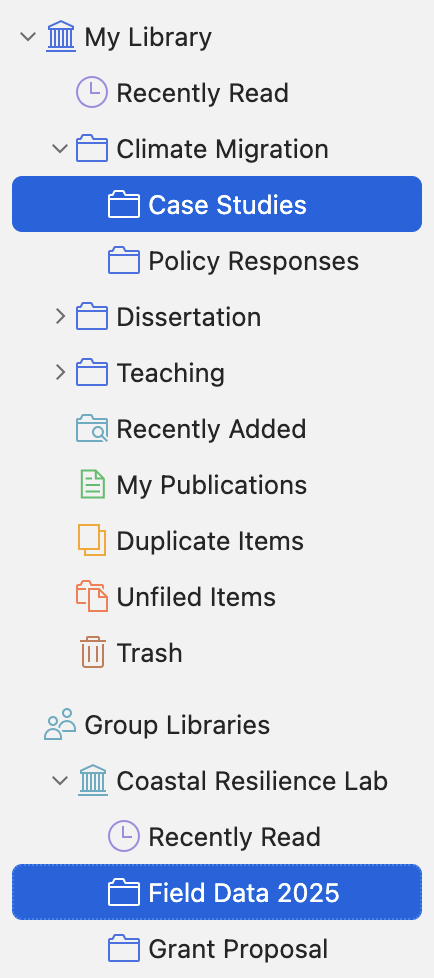
Zotero 10 introduces multi-collection selection, a feature that significantly enhances library navigation and management. Users can now select multiple rows in the collections pane, enabling them to view items from all selected collections simultaneously. This allows for rapid consolidation of related research materials, whether they are spread across different folders or saved searches. The functionality extends across multiple libraries, providing a unified view of items from diverse research projects or datasets.
When items are viewed from multiple libraries, the items list now intelligently groups them by library, with a persistent header indicating the current library as the user scrolls. The "Select All" command (Cmd/Ctrl-A) has also been refined to intelligently expand selections within parent collections, facilitating the selection of all items within related subcollections. This interconnectedness between multi-collection selection and the advanced search capabilities empowers users to perform complex queries across vast swathes of their research library, even encompassing all libraries within their Zotero database.
Robust Undo Support and Efficient Batch Editing
A major workflow improvement in Zotero 10 is the introduction of comprehensive undo support. Users can now reverse a wide range of operations, from mistakenly overwriting a field to accidentally dragging a collection to an incorrect location, using standard keyboard shortcuts (Cmd/Ctrl-Z) or through the "Edit" menu. While not all operations are currently covered, such as the deletion of annotations directly from the items list, the Zotero development team has indicated plans to expand this functionality in future updates. This safety net significantly reduces the anxiety associated with making changes to large datasets.
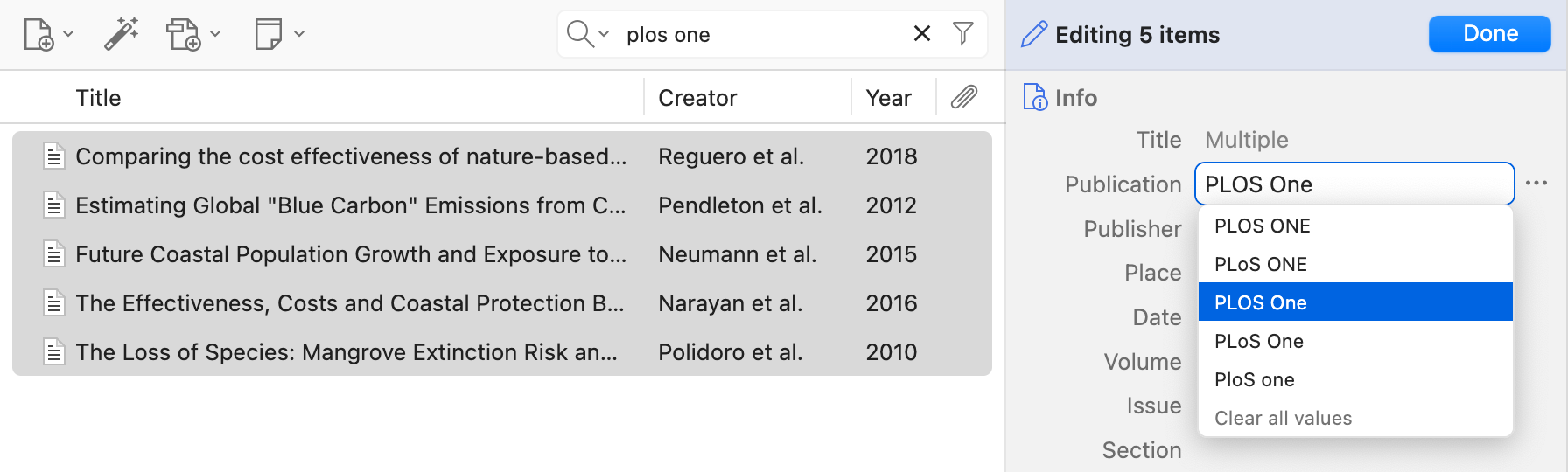
Complementing the undo functionality is a streamlined batch editing feature. Researchers can now select multiple items in the items list and choose to "Edit Multiple Items." This opens a dialog where changes can be applied simultaneously to all selected items. For fields containing multiple values, the interface displays "Multiple," and users can access and modify existing values or clear them entirely. This feature, combined with the new undo support and advanced search, allows for efficient bulk updates to metadata, saving considerable time and effort. While editing item types, creators, or tags across multiple items is not yet supported, it is a planned addition for future releases.
Smarter Read Aloud and Innovative Reading Mode for PDFs
Zotero 10 brings substantial improvements to its Read Aloud feature, making it a more intelligent and less intrusive tool for engaging with documents. The system now better identifies and skips over common elements that can disrupt the reading flow, such as in-text citations, headers, and footers. Tables, figures, and equations are also intelligently bypassed, preventing the tedious reading of every cell or axis label. Paragraphs are now read continuously, even if they span across columns or pages, ensuring a smoother listening experience.
These advancements are powered by a new custom document-analysis system that can identify various elements within PDFs, EPUBs, and snapshots. This system is still under refinement, and Zotero encourages user feedback on its forums to address any instances where the feature misinterprets document content. By default, Read Aloud now highlights individual sentences as they are read, offering greater precision in tracking the spoken text. Dedicated buttons for skipping forward or backward by sentence have also been added, and users can configure highlighting preferences (word or paragraph) in the settings.
Complementing the enhanced Read Aloud is the introduction of a dedicated Reading Mode for PDFs. This feature provides a clean, reflowable view of PDF documents, stripping away distracting elements like headers, footers, and multi-column layouts. Users can adjust font, size, and line spacing to their preference. Non-textual elements like images and tables are rendered as they appear in the original PDF, ensuring no content is lost.
What sets Zotero’s Reading Mode apart is its interactive nature. Unlike read-only modes in other applications, Zotero’s Reading Mode allows users to continue annotating directly within the reflowed view. Highlights and underlines can be added, along with notes, and these annotations seamlessly appear in the standard PDF view as well. While some annotation types (text, image, ink) are currently only visible in the PDF view, future updates aim to integrate them into a sidebar. The reading position also persists when switching between modes, offering a fluid transition for users. This dual functionality makes Zotero 10 a more comprehensive tool for deep engagement with research literature.
Additional Enhancements and Availability
Beyond these headline features, Zotero 10 incorporates a range of other improvements. These include an enhanced Zotero Connector for Safari, a citation preview within the citation dialog, and a significant reduction in memory usage for reader tabs. A detailed changelog is available on the Zotero support website for a comprehensive overview of all modifications.
Users of Zotero can upgrade to version 10 by navigating to "Help" > "Check for Updates" within the application. For new users, Zotero 10 is available for download from the official Zotero website, continuing its commitment to providing powerful research tools free of charge. The release of Zotero 10 marks a significant milestone, reinforcing its position as an indispensable tool for researchers worldwide by continuously adapting to the evolving needs of academic and scientific inquiry.