ChatGPT Enters the Presentation Arena, Challenging Google Slides with an AI-Powered Builder

ChatGPT’s rapid evolution has seen it transition from a conversational chatbot to a multifaceted productivity tool, with its latest significant advancement being the introduction of a comprehensive slideshow creator. This new feature, dubbed ChatGPT Slides, allows users to generate PowerPoint-style presentations directly within their chat interactions. Initially rolled out to users on the Pro tier and above, which requires a substantial monthly investment of at least $100, the tool signifies OpenAI’s ambition to create an integrated office suite within the ChatGPT ecosystem. While users on lower subscription tiers and the free plan can still generate downloadable PowerPoint files from conversations, these offer a more rudimentary experience compared to the full ChatGPT Slides functionality, lacking collaborative features and native editing capabilities. This strategic move positions OpenAI as a direct competitor to established productivity giants like Google and Microsoft, aiming to consolidate work tasks within a single AI-powered platform.

The introduction of ChatGPT Slides is part of a broader strategy by OpenAI to equip ChatGPT with a suite of office productivity tools. This follows the earlier release of Pages, a word processing application available to Pro tier users and above, with a spreadsheet application reportedly in development. The overarching vision is to enable users to complete a comprehensive range of work tasks without the need to switch between different applications or platforms from other providers. This article delves into a detailed comparison of ChatGPT’s presentation capabilities across its various tiers against Google’s AI-assisted presentation tools, offering an analysis of their current strengths, weaknesses, and potential future implications.
Evolution of AI in Presentation Creation
The concept of AI assisting in content creation, particularly for professional documents like presentations, has been a growing area of development. For years, presentation software has relied on templates and user-driven design. However, the advent of sophisticated language models has opened new avenues for automation and generation. OpenAI’s foray into this space with ChatGPT Slides is a logical extension of its core AI technology.

The timeline of this development can be traced through OpenAI’s product releases. The initial ChatGPT model demonstrated remarkable capabilities in understanding and generating human-like text. This led to the integration of plugins and custom GPTs, allowing users to extend its functionality. The introduction of dedicated applications like Pages and now Slides represents a significant step towards a more integrated and task-oriented AI assistant.
OpenAI has not provided specific details regarding the development timeline for ChatGPT Slides beyond its recent announcement. However, the speed at which new features are integrated suggests a continuous cycle of research, development, and deployment. The current tiered access model is a common strategy for AI service providers, allowing for controlled rollout, testing, and monetization while gathering user feedback.

ChatGPT’s Presentation Capabilities: A Tiered Approach
David Nield, a technology journalist with over 20 years of experience in gadgets and apps, conducted a comparative analysis of ChatGPT’s presentation features. His assessment highlights the distinct experiences offered across different subscription levels.
Free and ChatGPT Plus Tiers:
For users on the free ChatGPT plan or the $20-a-month Plus tier, the ability to generate presentations is present, albeit in a more basic form. Users can initiate a conversation, provide content, and then request a slideshow or PowerPoint file based on that discussion. The Plus account also offers a specific "Presentations" add-on accessible via a ‘+’ menu in the prompt box. However, Nield notes that this feature appears to be in flux following the arrival of the full ChatGPT Slides.

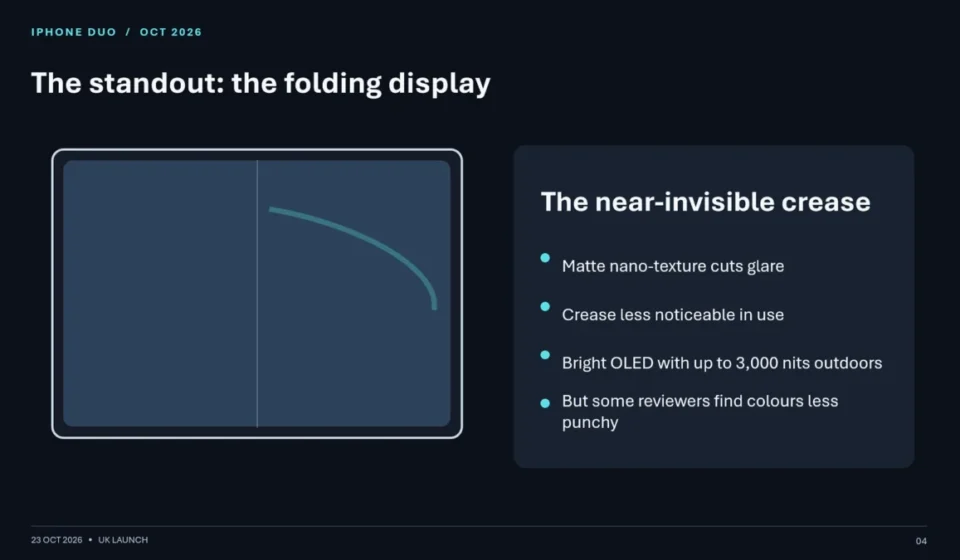
During testing, Nield asked ChatGPT to generate a slideshow on the new iPhone Duo, covering its key features and early online reactions. The output on the $20 Plus account was described as "fairly competent," containing accurate information and a simple series of layouts. While ChatGPT could incorporate an official photo of the iPhone Duo when specifically requested, the overall presentation lacked refinement, resembling a quickly assembled deck from a template with unaligned bullet points and selective inclusion of details. Edits could be made by describing them in the general prompt box, but precise manipulation of individual slide elements was not possible. For occasional conversion of conversations into rough slideshows, Nield suggests these tiers suffice without an immediate need for an upgrade.
ChatGPT Pro Tier and Above:
For users on the Pro tier, ChatGPT Slides offers a more dedicated and comprehensive experience. This version includes a distinct area within the app for creating presentations, allowing users to start from scratch or build decks using prompts. While basic image and text features are available, the primary method of content generation is through prompts.

Nield found the prompt-driven creation process to be somewhat tedious, comparing it unfavorably to the direct manipulation offered by traditional software. He also noted some bugginess during his testing period, with certain requests not completing as expected. However, he found the process of starting a standard conversation and then converting its content into a deck to be more effective. The iPhone Duo slideshow generated using this method on the Pro tier was longer, better laid out, and more informative than the one produced on the Plus plan, even including charts of battery life and official photos.
Despite the improvements, Nield’s analysis points to a lack of overall polish and coherence across all tiers. He observed that the presentations often lacked a smooth flow, feeling more algorithmically generated than human-curated. While individual elements could be resized and repositioned, and edits could be requested via prompts, the fundamental structure and information selection appeared to be dictated by the AI without a deep understanding of narrative flow or audience engagement.

Collaborative Features and Future Potential
ChatGPT Slides does incorporate collaborative tools, though Nield was unable to test them. He acknowledges their potential usefulness for teams already integrated into the ChatGPT ecosystem. The tool is seen as potentially beneficial for situations where a large amount of information needs to be quickly transformed into a vaguely presentable slideshow. However, Nield ultimately leans towards traditional presentation methods for their precision, manageability, and user control, even if they require more time. He also points out the abundance of templates and layout aids in modern presentation software that simplify the creation of visually appealing and informative content.
Comparison with Google Slides and Gemini
To provide a comprehensive comparison, Nield also evaluated Google Slides with Gemini, its AI-powered assistant. This comparison involved a similar task: creating a slide deck on the new iPhone Duo for users paying for Google AI Pro ($19.99 a month) or higher.

A key differentiator highlighted by Nield is Gemini’s interactive approach. During the creation process, Gemini posed clarifying questions regarding visual style, target audience, and key details to highlight. While such prompts can be manually entered into ChatGPT, Gemini’s proactive questioning was seen as a valuable addition.
The output from Gemini and Google Slides was described as impressive in terms of layout and overall aesthetic. Nield felt it more closely resembled a human-created presentation in its information selection, slide arrangement, and color choices compared to ChatGPT’s output. However, this iteration also had its flaws. The presentation contained inaccuracies regarding the iPhone Duo screen’s maximum brightness, and a generated graphic of the "iPhone Duo" appeared to be a composite of older iPhone models, lacking the accuracy of official imagery that ChatGPT Slides had managed to procure.

Furthermore, Nield noted that while specific edits could be requested via general prompts in both platforms, Google Slides, being a more mature and established tool with a decade of development, offers a broader range of features and layout options.
Analysis and Implications
The introduction of ChatGPT Slides signifies a significant step in OpenAI’s strategy to embed its AI technology into everyday professional workflows. The tiered access model, while currently limiting full functionality to higher-paying users, suggests a roadmap for broader accessibility in the future. The competitive landscape is intensifying, with both OpenAI and Google investing heavily in AI-powered productivity tools.

Key Implications:
- Shift in Productivity Software: The trend towards AI-integrated productivity suites could fundamentally alter how users create documents, presentations, and spreadsheets. This may lead to increased efficiency for some tasks but also raises questions about the future role of human creativity and critical judgment in content creation.
- Monetization of AI Services: OpenAI’s tiered pricing model for advanced features like ChatGPT Slides highlights the ongoing effort to monetize AI capabilities. This approach allows for continuous development and funding while providing premium services to dedicated users.
- Competition and Innovation: The direct competition between OpenAI and Google in this space is likely to spur further innovation. Users can anticipate more sophisticated AI features, improved accuracy, and enhanced user experiences from both platforms.
- Data Accuracy and Bias: As AI tools become more integrated into content creation, the accuracy of the generated information and potential biases within the AI models become critical concerns. Nield’s observations about factual errors and awkward graphical representations underscore the need for human oversight and verification.
- User Adoption and Workflow Integration: The ultimate success of ChatGPT Slides will depend on its ability to seamlessly integrate into existing user workflows and offer tangible benefits over traditional methods. While the AI can automate initial content generation, the need for human refinement, strategic thinking, and creative design remains paramount.
In conclusion, ChatGPT Slides represents a compelling new entrant in the AI-assisted presentation market. While it demonstrates impressive capabilities, particularly in its Pro tier, it still faces challenges in terms of polish, accuracy, and intuitive design compared to more established tools like Google Slides with Gemini. For now, it appears to be a valuable addition for existing ChatGPT power users but may not yet be a compelling enough reason for users to switch their AI allegiance. The ongoing development and competitive pressures, however, suggest that AI-powered presentation tools will continue to evolve rapidly, potentially reshaping the future of professional communication.