Zotero 10 Revolutionizes Research Management with Advanced Search, Enhanced Reading Tools, and Streamlined Workflows

August 17, 2026 – Zotero, the widely-used open-source research management software, has today unveiled Zotero 10, a significant update poised to redefine how academics, students, and researchers interact with and manage their scholarly resources. This latest iteration introduces a suite of powerful new features, including a dramatically enhanced advanced search functionality, a smarter and more intuitive Read Aloud capability, and a dedicated Reading Mode for PDF documents, all designed to bolster efficiency and deepen engagement with research materials. The release, which follows a period of beta testing and user feedback, marks a substantial leap forward in Zotero’s ongoing commitment to providing researchers with robust and accessible tools.
The development of Zotero 10 arrives at a time when the volume of digital research content continues to explode, placing increasing pressure on individuals to effectively organize, retrieve, and synthesize information. Traditional methods of managing large libraries can be cumbersome, and the ability to quickly locate specific pieces of information within a vast collection of documents is paramount. Zotero’s previous versions have been lauded for their ability to store, organize, and cite research, but the demand for more sophisticated search and analysis tools has been a consistent theme among its user base. Zotero 10 directly addresses these needs, offering a more intelligent and integrated research experience.
Advanced Search Capabilities Redefined
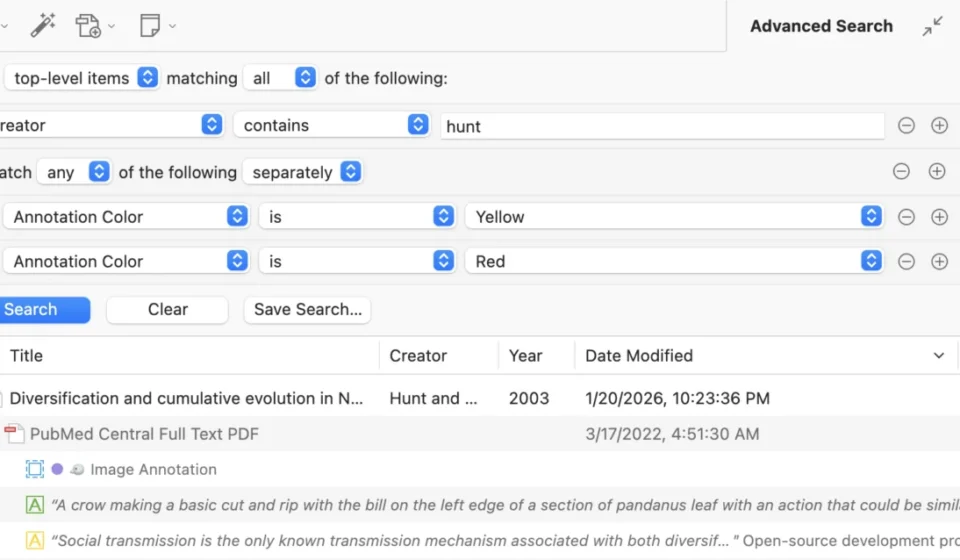
At the forefront of Zotero 10’s enhancements is a completely overhauled Advanced Search. Previously accessible through a less prominent interface, the new Advanced Search is now integrated directly into the main window via a dedicated filter button in the quick-search bar. This proximity allows users to seamlessly transition from broad searches to highly specific queries without leaving their primary workspace. The pane opens directly above the item list, enabling immediate interaction with filtered results.
The power of this new search lies in its sophisticated logic. Researchers can now construct complex search queries with nested condition groups, allowing for intricate combinations of criteria. A key innovation is the automatic mapping of conditions across different levels of the bibliographic hierarchy. This means a user can, for instance, search for top-level items that have a specific author AND contain a descendant annotation that is either yellow OR red. The system intelligently interprets the user’s intent, automatically adjusting search conditions to match the desired result level – whether it be top-level items, annotations, or attachments. This eliminates the previous need for chaining multiple saved searches, a process that was often time-consuming and prone to error.
The transition from the quick-search bar to Advanced Search is also more intuitive. Entering a query into the quick-search bar and then clicking the Advanced Search button will automatically populate equivalent advanced search conditions. This feature, combined with the persistent nature of the Advanced Search pane, addresses a long-standing user request for the ability to "pin" searches while navigating between different collections or saved searches.
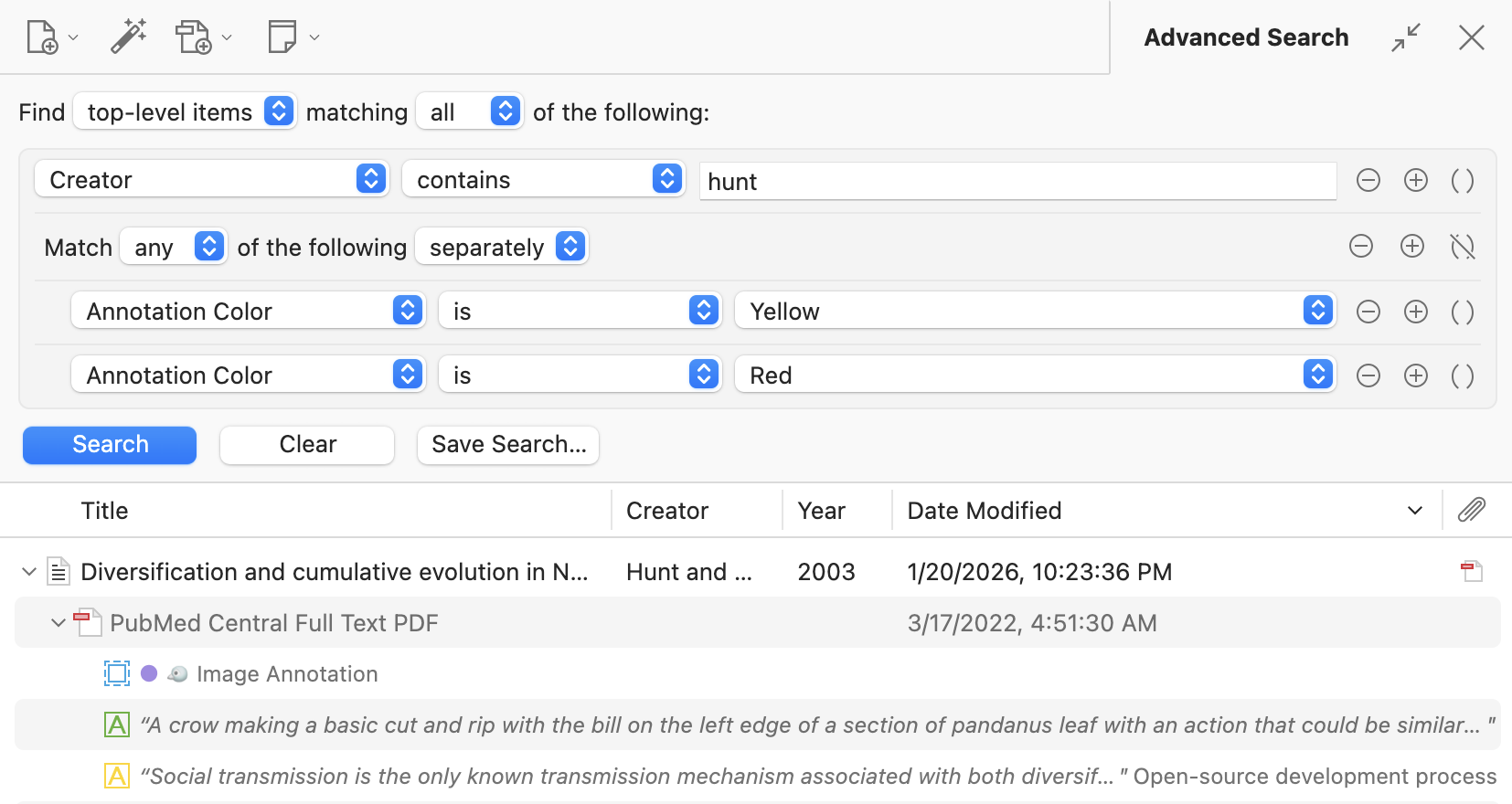
Furthermore, Zotero 10 introduces a host of new search conditions specifically tailored for annotations, such as "Annotation Color" and count-based filters like "# of Notes." The addition of "is empty" and "is not empty" operators provides even greater precision in filtering. These additions collectively transform Zotero’s search from a basic retrieval tool into a powerful analytical engine capable of uncovering nuanced relationships within a research library.
Accent-Insensitive Searching and Performance Boosts
Beyond the structured power of Advanced Search, Zotero 10 brings significant improvements to general searching across the application. Most search functions now operate with accent-insensitivity, recognizing typographic variations and formatting differences. This means searching for "cafe" will now reliably find "café," and "can’t" will match "can’t," a crucial improvement for multilingual research and for users who may encounter variations in spelling or character sets. Similarly, the system now handles variations in capitalization and subscripts, with searches for "h2o" effectively locating "H₂O" and "H2O."
Full-text content searches, a critical component for researchers working with PDF documents and other attached files, have also seen a dramatic performance upgrade. The "Attachment Content" condition in Advanced Search and quoted phrases in the quick-search bar now return results almost instantaneously, a stark contrast to the previous method of scanning files on disk. This optimization is particularly beneficial for users with extensive libraries and large document collections.
For users working with East Asian languages, Zotero 10 now offers more accurate and faster searching. Previously, unquoted searches for Chinese, Japanese, or Korean (CJK) text might match individual characters within attachment content. The new implementation ensures that unquoted CJK searches now match the full phrase, significantly improving search precision and speed.
Under the hood, Zotero’s background processing of attachment content has been overhauled. New content is indexed faster and more reliably. The developers recommend ensuring that "Sync full-text content" is enabled in the Sync settings. This setting is vital for users who rely on Zotero’s syncing capabilities, as it allows them to search full-text content already indexed on other devices, even if the local file is not immediately available due to on-demand downloads. This also prevents redundant indexing work across multiple devices, optimizing resource utilization.
Multi-Collection Selection and Enhanced Library Management
Zotero 10 introduces Multi-Collection Selection, a feature that dramatically enhances the ability to view and manage items across multiple collections simultaneously. Users can now select multiple rows in the collections pane, and Zotero will display a consolidated view of all items belonging to those selected collections. This functionality extends to saved searches as well, allowing researchers to quickly see the combined results of several pre-defined queries.
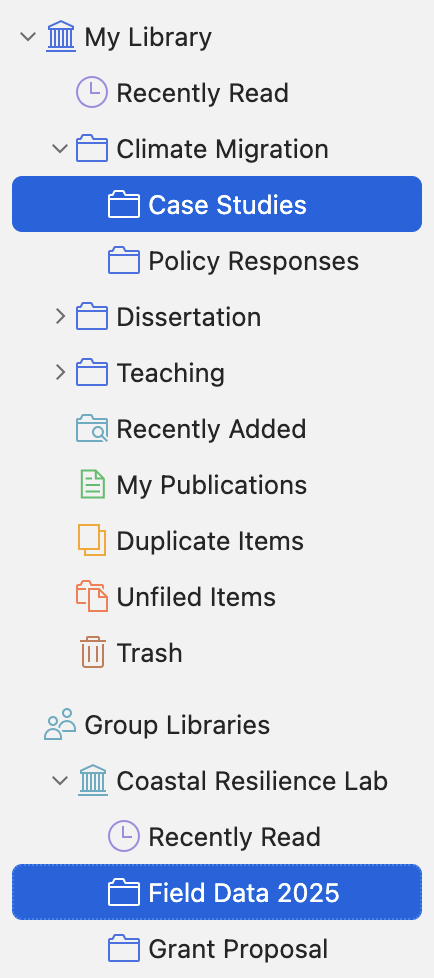
The power of Multi-Collection Selection is amplified by its cross-library compatibility. Users can now select items from different libraries and view, search, and interact with them collectively. The item list intelligently groups items by library, with a sticky header for the currently viewed library that remains visible as the user scrolls.
The "Select All" command (Cmd/Ctrl-A) has also been made more context-aware. When applied within a collection hierarchy, it now intelligently expands to select all items within the same parent or sibling collections. This offers a more efficient way to select large groups of related items, potentially replacing cumbersome manual selection processes or the need to utilize "Show Items from Subcollections" views. When "Select All" is applied at the library level, it now encompasses all other libraries within the user’s database. This integrated approach, combined with the new in-window Advanced Search, empowers users to conduct sophisticated, broad-reaching queries and management tasks across their entire research repository.
Undo Support and Batch Editing for Increased Workflow Flexibility
Two highly anticipated features in Zotero 10 are Undo Support and Batch Editing, both designed to improve user control and reduce the impact of accidental errors. The Undo/Redo functionality, accessible via the Edit menu or standard keyboard shortcuts (Cmd/Ctrl-Z), now covers a wide range of operations. This means that mistakes such as accidentally overwriting a field or misplacing a collection can be easily rectified. While not all operations are yet covered, such as deleting an annotation from the item list, the developers have indicated plans to expand this support in future updates.
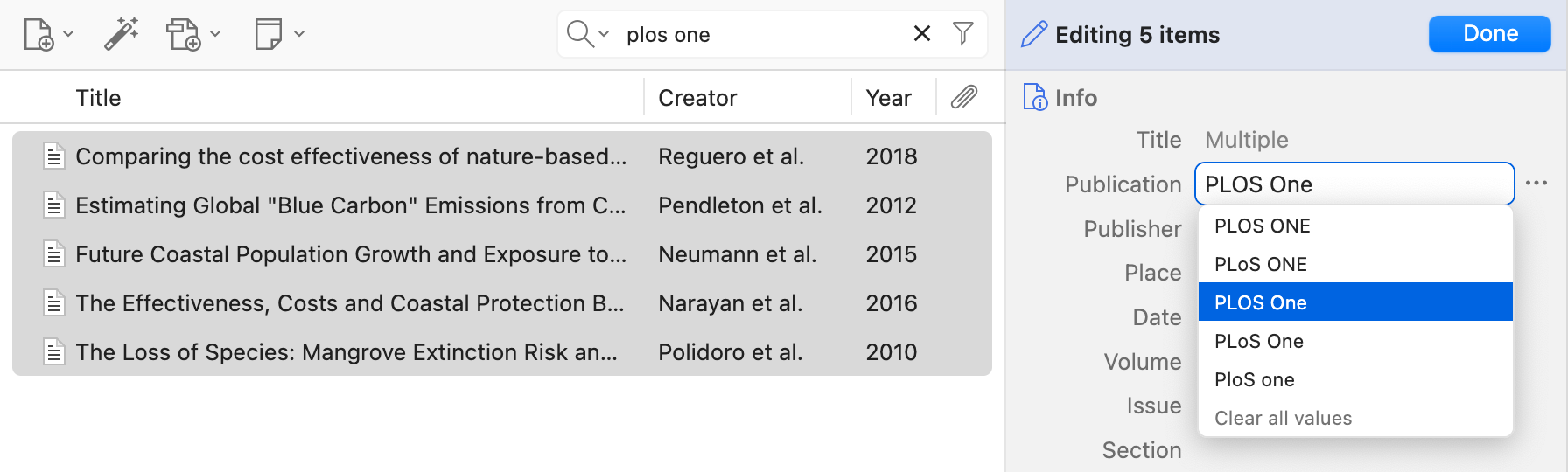
Batch Editing allows users to modify multiple items simultaneously. By selecting several items in the item list and choosing "Edit Multiple Items," users can then make changes that will be applied to all selected items. Fields containing multiple values will display "Multiple," and clicking into such a field reveals available options. A "Clear all values" option is also provided. This feature, when combined with Undo Support, provides a safety net for bulk modifications, allowing users to experiment with edits without fear of permanent data loss. The Advanced Search functionality also plays a crucial role here, enabling users to precisely identify specific sets of items for batch editing. Currently, editing item types, creators, or tags on multiple items is not supported, but this is another area targeted for future development.
Smarter Read Aloud and New PDF Reading Mode
Zotero 10 significantly elevates the reading experience with substantial improvements to its Read Aloud feature and the introduction of a dedicated Reading Mode for PDFs. The Read Aloud functionality has been made considerably more intelligent, now adept at skipping over common distractions within academic documents. This includes in-text citations, headers, footers, tables, figures, and equations. Instead of reading out every cell in a table or every label on an axis, Read Aloud focuses on the core narrative of the text. Paragraphs are now read continuously, even if they span across columns or pages. For large documents, the feature also boasts faster startup times.
These enhancements are powered by a new custom document-analysis system that identifies distinct elements within PDFs, EPUBs, and snapshots. The Zotero team acknowledges that this system is still being refined and actively encourages users to report any instances where Read Aloud misinterprets content, whether by reading unnecessary elements or skipping crucial ones, via the Zotero Forums.
By default, Read Aloud now highlights individual sentences as they are read, offering a more granular tracking of the text. Dedicated buttons have been added for sentence-level navigation (skip ahead or back). Users can also configure highlighting preferences to display by word or paragraph, with word highlighting availability dependent on the chosen voice.
Complementing the improved Read Aloud is the new Reading Mode for PDFs. This feature presents a clean, reflowable view of PDF documents, free from the visual clutter of headers, footers, and multi-column layouts. Users can adjust font, size, and line spacing for a personalized reading experience. Importantly, non-textual elements such as images and tables are rendered as they appear in the original PDF, ensuring no content is lost.
A key distinction of Zotero’s Reading Mode is its interactive nature. Unlike many applications where reading modes are read-only, Zotero allows users to annotate directly within this reflowed view. Highlighting, underlining, and adding notes are all possible, and these annotations are seamlessly integrated into the standard PDF view. Annotations made with other tools (text, image, ink) will be displayed in the PDF view, with plans to integrate them into the sidebar in future releases. Reading position is also preserved when switching between Reading Mode and the standard PDF view. To activate Reading Mode, users simply click the dedicated button in the reader toolbar. Like Read Aloud, Reading Mode leverages the same custom document-analysis system, and user feedback is solicited to further refine its performance.
Other Notable Improvements
In addition to these major features, Zotero 10 incorporates a range of other enhancements and bug fixes. These include an improved Zotero Connector for Safari, offering a more seamless browsing and saving experience. A citation preview is now available within the citation dialog, providing users with an immediate look at how their citations will appear. Furthermore, reader tabs have been optimized for dramatically lower memory usage, a significant improvement for users who often keep many documents open simultaneously. A comprehensive list of all changes is available in the official Zotero 10.0 changelog.
Availability
Zotero 10 is available immediately. Existing users can upgrade directly from within the Zotero application by navigating to Help > Check for Updates. New users can download Zotero 10 from the official Zotero website. This release solidifies Zotero’s position as an indispensable tool for researchers seeking to navigate the ever-growing landscape of academic information with greater efficiency, precision, and ease.