
The Dark Side of Calendar-Based Time Intelligence in Power BI: A Deep Dive into DAX Challenges and Solutions

The landscape of data analytics within the Microsoft Power BI ecosystem has undergone a significant transformation with the introduction of calendar-based time intelligence. This feature, currently in preview, was designed to simplify the complex task of managing multiple calendar systems—such as Gregorian, ISO-8601, and custom fiscal calendars—directly within the Data Analysis Expressions (DAX) engine. While the initial reception among data architects and business intelligence professionals was characterized by widespread enthusiasm, a more rigorous application of these tools in real-world scenarios has revealed a series of technical intricacies and "darker sides." These challenges, ranging from leap year discrepancies to hierarchy synchronization issues, necessitate a deeper understanding of the underlying DAX logic to ensure reporting accuracy.

The Shift from Classic to Calendar-Based Logic
For years, Power BI developers relied on a standard set of time-intelligence functions—such as SAMEPERIODLASTYEAR, DATESMTD, and DATEADD—which operated against a marked date table. While effective, these functions were inherently tied to the Gregorian calendar. Organizations utilizing week-based retail calendars (like the 4-4-5 or 4-5-4 structures) were forced to write exhaustive, custom DAX measures to handle period-over-period comparisons.
The new calendar-based time intelligence aims to bridge this gap by allowing developers to define specific calendar hierarchies within the model. By assigning columns to specific categories—such as Year, Quarter, Month, and Day—the DAX engine can theoretically handle time-shifting logic across different calendar types automatically. However, the implementation of this logic introduces a paradigm shift in how functions like DATEADD calculate offsets, moving away from simple date arithmetic toward a "Distance from Parent" mechanism.

The Chronology of Implementation and Community Discovery
The rollout of these features began as part of Microsoft’s broader initiative to modernize the Power BI modeling engine. Following the initial announcement at major industry conferences, the community of expert DAX developers began stress-testing the preview. Early documentation from Microsoft and technical deep-dives from industry leaders like SQLBI provided the framework for understanding how the engine maps dates within a hierarchy.
As developers moved from theoretical models to production-grade reports using large-scale datasets, such as the ContosoRetailDW sample, specific anomalies began to surface. These anomalies were not immediately apparent in simple datasets but became glaringly obvious when analyzing transitions between leap years and non-leap years, or when attempting to mix weekly and monthly reporting logic in a single visual.

Technical Analysis: The Leap Year Discrepancy
One of the most significant issues identified involves the calculation of Previous Year (PY) values during leap years. In a standard Gregorian setup, one would expect March 1, 2025, to compare directly to March 1, 2024. However, under the new calendar-based DATEADD function, a shift occurs.
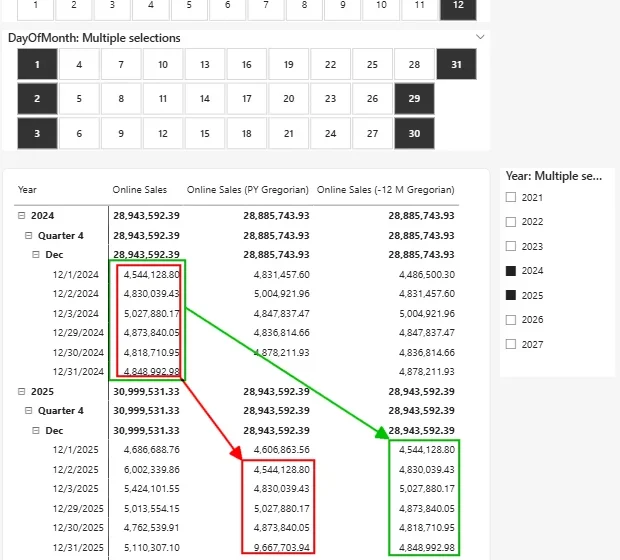
In a leap year like 2024, there are 366 days. When the DAX engine uses the "Year" category as the parent to calculate the distance for a specific date, it counts the number of days from the start of that year. Because 2024 includes February 29, any date following that leap day has a different "distance from the start of the year" compared to a non-leap year. Consequently, when comparing 2025 to 2024, the PY values for March through December are shifted by exactly one day.

Data analysis shows that while the monthly totals may eventually reconcile, the daily granularity is compromised. This is particularly problematic for industries where specific day-of-week performance is critical, such as hospitality or retail. If a report shows March 15, 2025 (a Saturday), compared to the data for March 14, 2024 (a Thursday), the variance analysis becomes functionally useless for operational decision-making.
Month Length Variance and the New DATEADD Parameters
The traditional DATEADD function in DAX was known for its "snapping" behavior. If a user moved back one month from March 31, the function would return February 28 (or 29), effectively snapping to the end of the shorter month. The new calendar-based logic handles this differently, prioritizing the hierarchy’s structure.

Observations of the end of March 2024 versus February 2024 show that the results of the two measures—classic versus calendar-based—diverge significantly on the final three days of the month. The calendar-based measure ensures that the row sums equal the total shown in the summary row, a consistency that was sometimes difficult to maintain with classic DAX without complex filters. To address the nuances of unequal month lengths, Microsoft has introduced two additional parameters to the DATEADD function, allowing developers more control over how the engine handles these "overflow" days. Awareness of these parameters is now essential for any developer migrating existing reports to the new system.
The Weekly Hierarchy and the "Ghost Value" Phenomenon
The application of this technology to week-based calendars (ISO-8601) has yielded perhaps the most baffling results. In certain data models, weekly PY calculations exhibit a "ghosting" effect where values only appear in a table visual when specific levels of the hierarchy are expanded.

In experimental setups using identical source data across two different Power BI files, developers have reported inconsistent behavior. In one model, a table visual might show identical values for every row in a year until a specific week is expanded, at which point the correct values populate. In another model, built with the same logic, the values appear correctly from the outset.
This suggests that the preview engine may still struggle with metadata consistency or caching when multiple calendars are defined on the same date table. While rebuilding the data model from scratch often resolves the issue, this is not a viable solution for enterprise-level environments with hundreds of interconnected measures. The lack of a clear root cause for this behavior remains a point of concern for architects aiming for high-availability reporting.

Integration Barriers: Mixing Monthly and Weekly Logic
A common requirement in corporate reporting is the "Same Weekday, Previous Year" comparison within a monthly report. This requires a hybrid logic: the report is filtered for a Gregorian month (e.g., October), but the comparison data must come from the corresponding week and weekday of the previous year.
Under the current constraints of the calendar-based feature, this setup triggers validation errors. Microsoft’s engine requires "consistent categorization," meaning that if a YearOfWeek column is used for the Year category to support weekly logic, it cannot easily coexist with a standard Gregorian Month category in the same hierarchy because they do not align perfectly. Weeks often straddle the boundaries of two months.

As a result, developers find themselves unable to use standard DATESMTD (Month-to-Date) functions within a weekly calendar structure. The engine simply cannot find the necessary "Month" category to perform the calculation. This forces a return to custom, complex DAX logic, effectively negating the "ease of use" benefits that the new feature was intended to provide.
Broader Implications for Business Intelligence
The current state of calendar-based time intelligence in Power BI serves as a reminder of the complexities inherent in temporal data. While the feature offers a path toward more intuitive modeling, the "dark sides" identified—leap year shifts, hierarchy bugs, and categorization rigidities—indicate that it is not yet a "set and forget" solution.

For organizations, the implications of these technical hurdles are significant:
- Audit Risks: Inaccurate PY comparisons during leap years could lead to incorrect financial forecasting and budget variances.
- Development Overhead: Rather than simplifying models, developers may need to implement workarounds, such as using a 12-month offset (
-12, MONTH) instead of a 1-year offset (-1, YEAR) to bypass the leap year day-shift. - Data Model Complexity: The potential need for multiple date tables to handle different calendar types—a practice many architects try to avoid—may become a necessity to prevent cross-calendar interference.
Expert Recommendations and Future Outlook
Industry experts suggest a cautious approach to adopting these features in production environments while they remain in preview. The most effective workaround for the leap year shift identified is to calculate the previous year by moving back 12 months at the month granularity level, which appears to maintain correct day-alignment in the Gregorian calendar.

Furthermore, for weekly logic, ensuring that the date table is meticulously aligned with ISO-8601 standards or specific retail definitions is paramount. The fact that weekly calculations correctly map weekdays without the shifting issues seen in monthly logic is a positive sign, suggesting that when the periods are of equal length (7 days), the "Distance from Parent" logic works flawlessly.
As Microsoft continues to refine this feature, the community expects updates that will address the synchronization of hierarchies and perhaps offer more flexibility in mixing calendar categories. Until then, the "shiny new feature" requires a high degree of technical scrutiny and a robust validation process to ensure that the "dark side" of automation does not compromise the integrity of business data.