
Zotero 10 Revolutionizes Research Management with Advanced Search, Enhanced Reading Tools, and Streamlined Workflow

[City, State] – [Date] – Zotero, the widely-used free and open-source research management software, has officially launched Zotero 10, ushering in a significant upgrade packed with powerful new features designed to enhance library management, search capabilities, and the reading and annotation experience for researchers, academics, and students worldwide. This release, available as of August 17, 2026, introduces a more sophisticated advanced search functionality, a dramatically improved "Read Aloud" feature, and a novel "Reading Mode" for PDF documents, alongside other workflow optimizations.
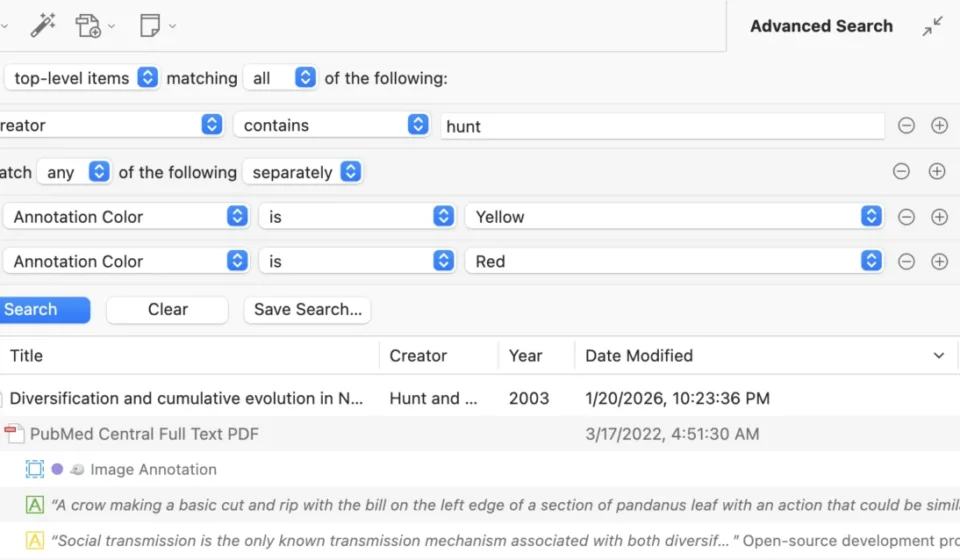
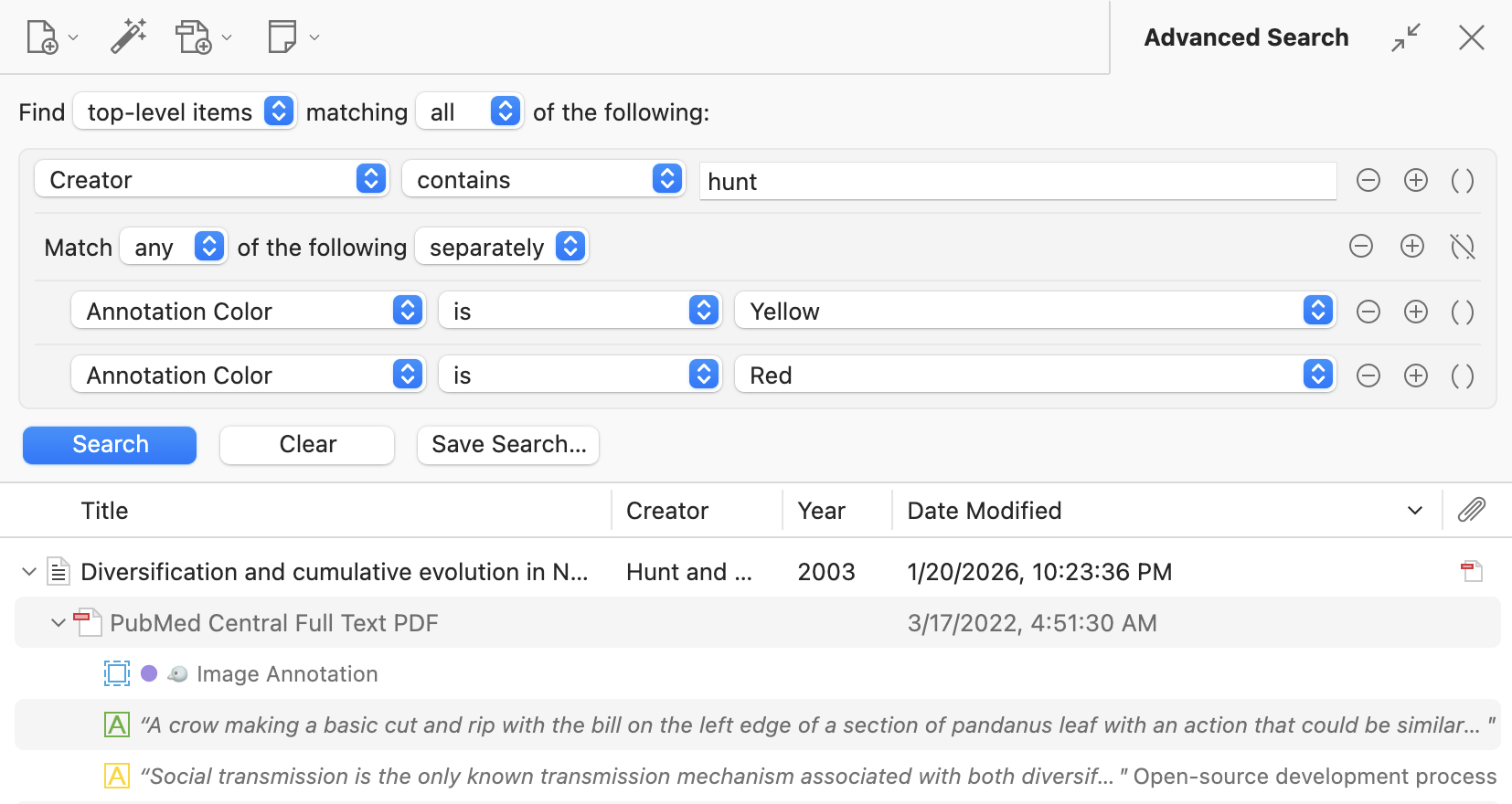
The core of Zotero 10’s innovation lies in its revamped search engine. Building upon its established reputation for robust bibliographic management, the latest iteration introduces an "Advanced Search" that moves beyond basic keyword matching to offer nuanced and hierarchical querying. This new functionality, accessible via a dedicated filter button within the quick-search bar, presents a persistent pane directly above the main item list. Users can now apply these advanced filters to any view, including specific collections or saved searches, allowing for immediate and precise manipulation of results.
Unprecedented Power in Library Search
The advanced search capabilities in Zotero 10 are a significant leap forward, featuring support for nested condition groups and automatic mapping of search criteria across different levels of the item hierarchy. This enables researchers to construct highly specific queries, such as locating top-level items authored by a particular individual, while simultaneously identifying any descendant annotations that are either yellow or red. The system intelligently maps search conditions to the desired result level, meaning users can find top-level items even when searching for annotation content several levels deep, or conversely, discover all annotations beneath top-level items tagged with a specific keyword. Previously, such complex searches often necessitated chaining multiple saved searches, a process now streamlined into a single, unified query.
"The ability to perform nested searches and have conditions automatically mapped across hierarchical levels is a game-changer," commented Dr. Anya Sharma, a computational linguist and long-time Zotero user. "For complex literature reviews, being able to precisely target items based on annotation content and document structure will save an immense amount of time and reduce the risk of missing critical information."
Furthermore, the integration of advanced search with the quick-search bar offers a seamless transition. Entering a query into the quick-search bar and then clicking the advanced-search button will automatically populate an equivalent advanced search configuration. Crucially, the advanced-search pane now persists as users navigate between collections, addressing a long-standing user request for pinned searches that remain active across different library sections. Zotero 10 also expands the available search conditions for annotations, including new options for "Annotation Color" and counts like "# of Notes," alongside the introduction of "is empty" and "is not empty" operators, providing even greater granularity in data retrieval.
Accent-Insensitive and Faster Full-Text Search
Complementing the advanced search enhancements, Zotero 10 introduces accent-insensitive searching across most of its functionalities. This means that searches will now disregard diacritical marks and typographic variations, ensuring that queries like "cafe" will successfully locate "café," and "can’t" will match "can’t." This feature extends to recognizing variations in formatting, such as finding "h2o" when searching for "H₂O" or "H2O."
The performance of full-text content searches has also seen a dramatic improvement. Both the "Attachment Content" condition in advanced search and quoted phrases in the quick-search bar now deliver results almost instantaneously, a significant departure from the previous method of scanning files on disk. This speed enhancement is particularly impactful for users working with large libraries or extensive PDF collections.
For users of Chinese, Japanese, and Korean (CJK) languages, Zotero 10 brings a more intuitive and efficient search experience. Previously, unquoted CJK searches in the quick-search bar might match individual characters within attachment content. Now, unquoted CJK searches accurately match the full phrase, and they do so with remarkable speed. This aligns Zotero’s CJK search behavior with that of other languages, simplifying the research process for a global user base.
Behind these search improvements is an overhauled system for processing attachment content in the background. New content is indexed more rapidly and reliably. Zotero’s development team emphasizes the importance of enabling "Sync full-text content" in the Sync settings for users employing syncing. This setting allows for searching full-text content already indexed on other devices, even when files are not locally available due to on-demand downloads, and prevents redundant indexing efforts across multiple machines. This optimization is crucial for maintaining a synchronized and searchable research environment across various devices.
Multi-Collection Selection and Undo Functionality
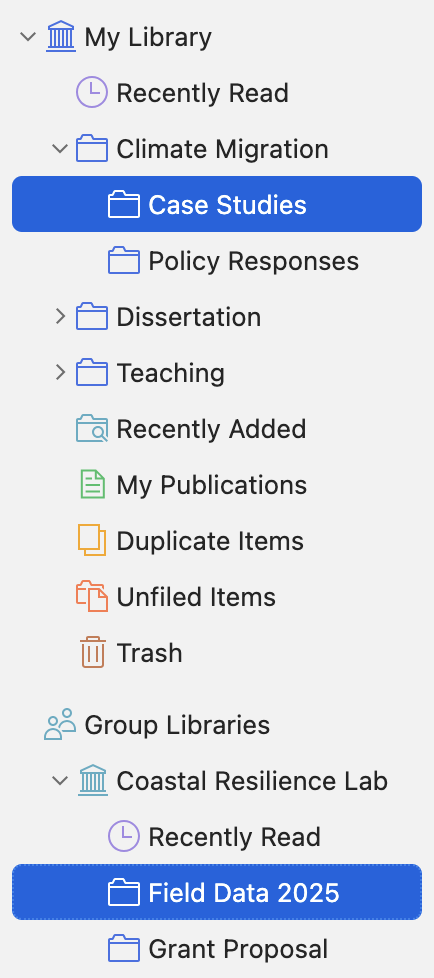
Zotero 10 introduces "Multi-Collection Selection," a feature that significantly enhances the management of items across different organizational structures. Users can now select multiple rows in the collections pane and view items from all selected views simultaneously. This allows for quick aggregation of content from multiple collections or saved searches. For instance, selecting two distinct collections will immediately display all items contained within both.
This multi-selection capability extends across different libraries within Zotero, enabling users to view, search, and interact with items from disparate libraries in a consolidated manner. The items list intelligently groups items by library, featuring a persistent header for the current library as the user scrolls. The "Select All" function (Cmd/Ctrl-A) has also been enhanced to intelligently expand selections within the same parent hierarchy, facilitating broader selections of subcollections and their siblings. When applied to an entire library, "Select All" now encompasses all other libraries in the user’s database, providing a powerful way to manage and analyze the entirety of their research collection.
The integration of multi-collection selection with the new in-window advanced search further amplifies its utility, enabling complex searches that span multiple collections or the entire Zotero database.
Adding another layer of user-friendly efficiency, Zotero 10 incorporates robust "Undo Support." Users can now reverse a wide range of operations, from accidental field overwrites to misplaced collection drags, using the "Edit > Undo/Redo" menu or standard platform keyboard shortcuts (Cmd/Ctrl-Z). While not all operations are presently covered, such as deleting an annotation directly from the items list, the Zotero team plans to extend this functionality to more actions in future updates. This undo feature, combined with batch editing capabilities, provides a crucial safety net for users, minimizing the risk of data loss or unintended modifications.
Streamlined Batch Editing and Smarter Read Aloud
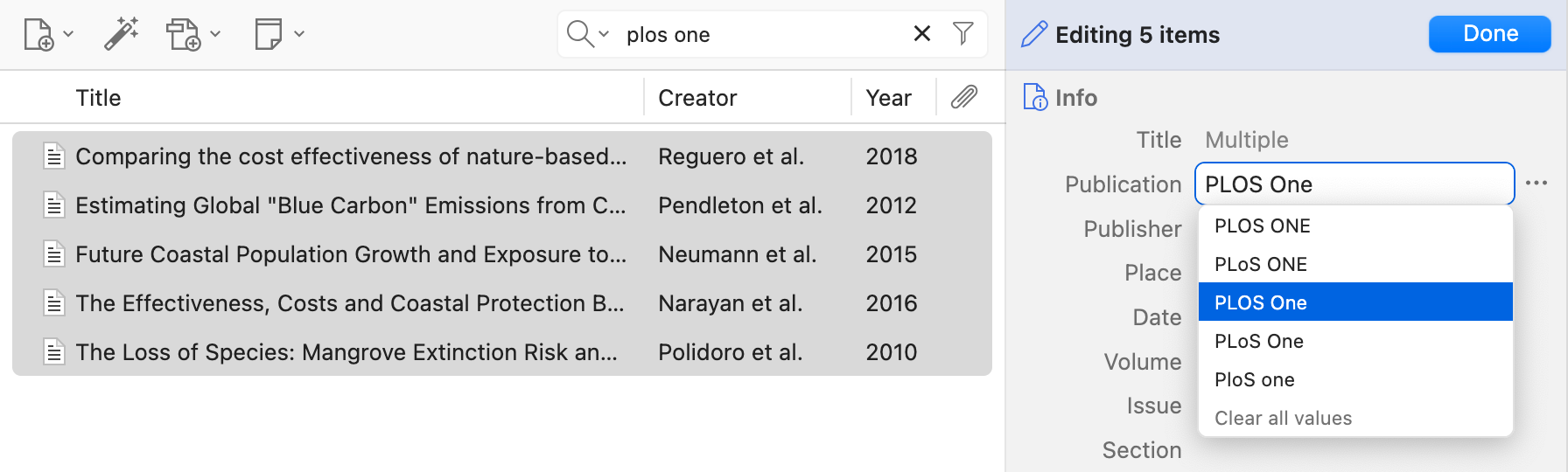
"Batch Editing" is another significant workflow improvement in Zotero 10. Users can now select multiple items in the items list, initiate the "Edit Multiple Items" option, and apply changes simultaneously across all selected items. Fields containing multiple values will be marked as "Multiple," and clicking on such fields will reveal available options, including a "Clear all values" choice. This feature is particularly useful for standardizing metadata, updating publication details, or making consistent corrections across a group of references.
The batch editing functionality is seamlessly integrated with the new undo support, allowing users to easily revert any accidental broad changes. Coupled with the advanced search, researchers can efficiently identify specific sets of items for bulk editing, further optimizing library maintenance. While editing item types, creators, or tags on multiple items is not yet supported, the Zotero team has indicated plans to incorporate these capabilities in future releases.
The "Read Aloud" feature has undergone substantial improvements in Zotero 10, aiming to provide a more intelligent and less disruptive audio reading experience. The updated system is designed to intelligently skip over in-text citations, headers, and footers, which are often extraneous to the core text. It will also bypass tables, figures, and equations, avoiding the reading of individual cell data or axis labels. Paragraphs will be read continuously, even if they span across columns or pages. For large documents, the audio output now begins more rapidly.
These advancements are driven by a new custom document-analysis system that identifies and differentiates various elements within PDFs, EPUBs, and snapshots. The Zotero team is actively refining this system and encourages user feedback through the Zotero Forums if any documents are not being read as expected.
By default, Read Aloud will now highlight individual sentences as they are spoken, rather than entire paragraphs. Dedicated buttons have been added to enable sentence-level skipping forward or backward. Users can customize highlighting to display by word or paragraph, with word highlighting dependent on the chosen voice, through the General pane of the settings. This granular control over the reading and highlighting process enhances comprehension and engagement with textual material.
Introducing Reading Mode for PDFs
A standout addition in Zotero 10 is the introduction of "Reading Mode" for PDF documents. This feature offers a clean, reflowable view of the PDF, divorced from the original document’s formatting constraints. Users can adjust font, size, and line spacing to their preference, and headers, footers, and multi-column layouts are removed. Content that cannot be represented as text, such as images, tables, or figures, will be rendered as they appear in the original PDF, ensuring no information is lost.
"Reading Mode is a revelation for accessibility and focus," stated Professor David Chen, a literature scholar. "The ability to strip away the visual clutter of academic papers and focus on the text, with customizable typography, makes prolonged reading sessions far more comfortable and productive. It bridges the gap between a static PDF and a dynamic reading experience."
Crucially, unlike in many other applications where reading modes are read-only, Zotero’s Reading Mode allows for annotation. Users can highlight and underline text, and add notes directly within this mode, with these annotations appearing in the standard PDF view as well. Annotations created with other tools (text, image, ink) will continue to be displayed only in the PDF view for now, with plans to integrate them into the sidebar in a future version. The user’s reading position is also preserved when switching between Reading Mode and the standard PDF view.
Reading Mode is powered by the same sophisticated document-analysis system that underpins the Read Aloud improvements. As with Read Aloud, Zotero is soliciting user feedback on the appearance and functionality of Reading Mode for specific documents, urging users to report any issues with missing text or mangled tables via the Zotero Forums.
Other Notable Improvements and Availability
Beyond these headline features, Zotero 10 includes a host of other enhancements and bug fixes. Notably, it features an improved Zotero Connector for Safari, a citation preview directly within the citation dialog, and a significant reduction in memory usage from reader tabs. A comprehensive list of all changes can be found in the official Zotero 10.0 changelog.
The release of Zotero 10 signifies a robust commitment from the Zotero development team to continually evolve the platform, addressing user needs for more powerful research tools and a more intuitive workflow. For existing users, upgrading to Zotero 10 is available through the "Help > Check for Updates" option within the Zotero application. New users can download Zotero 10 directly from the official Zotero website.
The ongoing development and release of major versions like Zotero 10 underscore its position as a vital tool for academic and research communities, consistently adapting to the evolving demands of information management and scholarly inquiry. The focus on advanced search, integrated reading tools, and workflow efficiencies suggests Zotero’s strategic direction towards empowering users with deeper control and more seamless interaction with their research libraries.