Safari 27.1 Enhancements for iPhone Duo Usher in New Era of Adaptive Web Design and PDF Viewing

Safari 27.1, the latest iteration of Apple’s web browser, introduces significant user-facing changes, particularly for owners of the recently released iPhone Duo. While a subtle shift in PDF rendering offers a more intuitive reading experience on the device’s unique foldable form factor, a more profound implication lies in Apple’s exploration of allowing web developers to extend content beyond the browser’s default display area on the iPhone Duo’s distinctive wider and shorter outer screen. This move, detailed in a recent WebKit blog post by Jen Simmons, signals a potential paradigm shift in how websites are designed and experienced on foldable devices, addressing a key pain point for developers and users alike.
Adaptive PDF Viewing on iPhone Duo
One of the most immediate and tangible benefits for iPhone Duo users arriving with Safari 27.1 is an enhanced PDF viewing experience. When the iPhone Duo is held in a partially folded, book-like orientation, Safari 27.1 now intelligently displays PDF documents across two pages, side-by-side. This mimics the natural reading experience of a physical book, offering a more immersive and less jarring way to consume multi-page documents. Upon flattening the screen or closing the device, Safari reverts to a single-page view, ensuring a seamless transition between different usage modes.
This feature is particularly noteworthy given the growing prevalence of digital documents and the increasing sophistication of mobile devices. While many users may opt to download PDFs for offline reading, the ability to smoothly browse them directly within the web browser on a device designed for versatile interaction is a significant user experience improvement. The automatic adaptation to the device’s physical orientation underscores Apple’s commitment to creating software that intelligently responds to hardware capabilities.
Unlocking New Design Horizons: Extending Content Behind Safari Controls
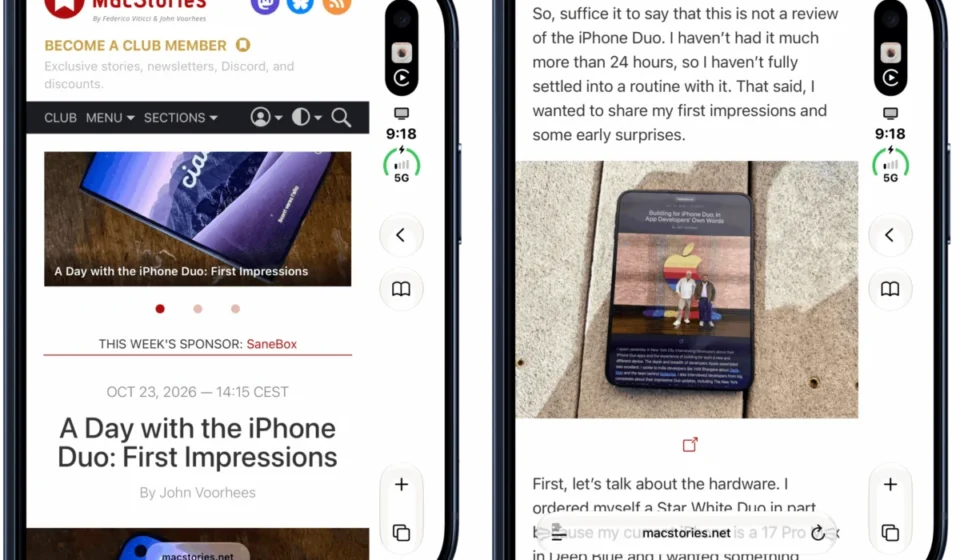
The more forward-looking and potentially impactful change stemming from Safari 27.1 centers on the browser’s handling of the iPhone Duo’s unique display. The outer screen of the iPhone Duo is characterized by its wider and shorter aspect ratio compared to traditional iPhone displays. To maximize vertical screen real estate for content, iOS strategically repositions browser controls, such as the address bar and tab management, to the side of the screen.
Historically, web content has been constrained to the area before these side-mounted controls. Safari 27.1, while not yet fully enabling content extension, acknowledges this limitation and signals Apple’s intention to rectify it. Currently, when these side controls are present, Safari fills the unoccupied space behind them with the webpage’s background color. This results in a visual disconnect, where websites appear "cut off" on the right side of the display, even if they have been optimized for the iPhone Duo’s new viewport dimensions.
Jen Simmons, writing on the official WebKit blog, elaborated on Apple’s vision: "We would like to give web designers and developers the ability to design and use that space in more creative ways. Perhaps you want to extend your header background across the full width of the display, for example. It might seem like there’s just one obvious way to make this possible, but really there are many possibilities." This statement is a clear indication that Apple is actively exploring and developing mechanisms to allow web content to flow seamlessly behind these adaptive UI elements.
Addressing Developer Frustration and Enhancing User Experience
The current limitation has been a source of frustration for web developers aiming to provide an optimal experience on the iPhone Duo. Websites that have been meticulously designed to accommodate the device’s unique screen dimensions find themselves visually incomplete when viewed through Safari on the outer display. As observed by MacStories, even websites fully updated for the iPhone Duo’s viewport sizes cannot extend their toolbars and other elements under Safari’s side controls. This leads to a perception of poor implementation on the part of the website developer, when in reality, the constraint lies with the browser’s current capabilities.
The implications of allowing web content to extend behind Safari’s controls are multifaceted. For developers, it opens up a new canvas for creative design. They could, for instance, extend background images, navigational elements, or branding across the entire width of the display, creating a more unified and immersive visual experience. This would allow for more sophisticated layouts that leverage the full potential of the iPhone Duo’s expansive outer screen.
A Timeline of Innovation and Future Possibilities
The introduction of Safari 27.1 and its forward-looking approach to iPhone Duo’s display challenges represents the latest step in Apple’s ongoing evolution of its web browsing technology. The release of the iPhone Duo itself marked a significant entry into the foldable smartphone market for Apple, necessitating adaptations in its software ecosystem to support this novel form factor.
Prior to Safari 27.1, developers were largely left to adapt their sites to the available screen space, often resulting in compromises. The current iteration of Safari, by acknowledging the issue and signaling intent for a solution, lays the groundwork for future updates. The process of enabling content extension is not trivial; as Simmons suggests, "there are many possibilities." This implies a period of research, development, and testing by Apple’s WebKit team to determine the most robust and flexible approach.
The expectation is that, once Apple provides the necessary tools and APIs, websites like MacStories, which have already made efforts to adapt to the iPhone Duo, will be able to further refine their implementations. This iterative process of hardware innovation, software adaptation, and developer engagement is characteristic of how new device categories mature.
Supporting Data and Industry Context
The emergence of foldable smartphones, while still a niche market, is growing. Reports from market research firms indicate a steady increase in foldable shipments. For example, Omdia projected that foldable smartphone shipments would reach approximately 10 million units in 2022 and continue to grow significantly in the coming years. This trend underscores the importance for browser developers like Apple to proactively address the unique UI and UX challenges presented by these devices.
The iPhone Duo, with its innovative dual-screen design, presents a particularly compelling case study. The need for adaptive interfaces that seamlessly transition between different states and configurations is paramount. Safari 27.1’s dual-page PDF view is a direct response to the physical interaction with the device, while the exploration of content extension addresses a more fundamental design challenge posed by its wider display.
Industry analysts have noted that the success of foldable devices hinges on the software ecosystem’s ability to fully support their unique capabilities. Without optimized applications and web browsing experiences, users may not fully appreciate the benefits of the foldable form factor. Apple’s proactive approach with Safari 27.1, therefore, is a crucial step in ensuring a positive user experience on the iPhone Duo.
Official Responses and Developer Community Reactions
The WebKit blog post by Jen Simmons serves as an official statement of intent from Apple. While not a concrete release of the feature, it provides a clear roadmap and reassures developers that their concerns are being heard and addressed. The language used – "We would like to give web designers and developers the ability…" – suggests a collaborative approach, where Apple is seeking to empower creators.
The developer community, particularly those who have been experimenting with the iPhone Duo, has expressed keen interest. The frustration of seeing websites visually incomplete on the outer display is a shared sentiment. The prospect of being able to extend content behind Safari’s controls has been met with anticipation. Once Apple implements these capabilities, it is expected that a wave of website updates will follow, showcasing innovative designs that fully utilize the iPhone Duo’s screen real estate.
Broader Impact and Future Implications
The developments in Safari 27.1 have implications that extend beyond the iPhone Duo and the immediate user base. They represent a crucial step in defining best practices for web design on foldable and multi-configuration devices. As more manufacturers explore similar form factors, the solutions developed by Apple for the iPhone Duo could become industry standards.
The ability for web developers to design for previously unusable screen real estate could lead to:
- Enhanced User Engagement: More immersive and visually appealing websites that keep users engaged for longer periods.
- New Design Possibilities: A canvas for creative expression that was previously unavailable, potentially leading to novel website layouts and interactive elements.
- Improved Accessibility: Greater flexibility in presenting information, which could benefit users with specific accessibility needs.
- Competitive Advantage: Websites that effectively leverage these new design opportunities will likely stand out and attract more users.
The ongoing work by Apple’s WebKit team to enable content extension behind browser controls on the iPhone Duo’s outer display is a testament to their commitment to adapting the web to evolving hardware. This move, coupled with the immediate enhancement of PDF viewing, signifies a significant step forward in mobile web browsing, particularly for devices that challenge traditional screen paradigms. As this technology matures, it promises to unlock new creative frontiers for web developers and offer a more refined and integrated experience for users of innovative devices like the iPhone Duo. The future of web design on foldable devices is being shaped, and Safari 27.1 is an important marker on that journey.