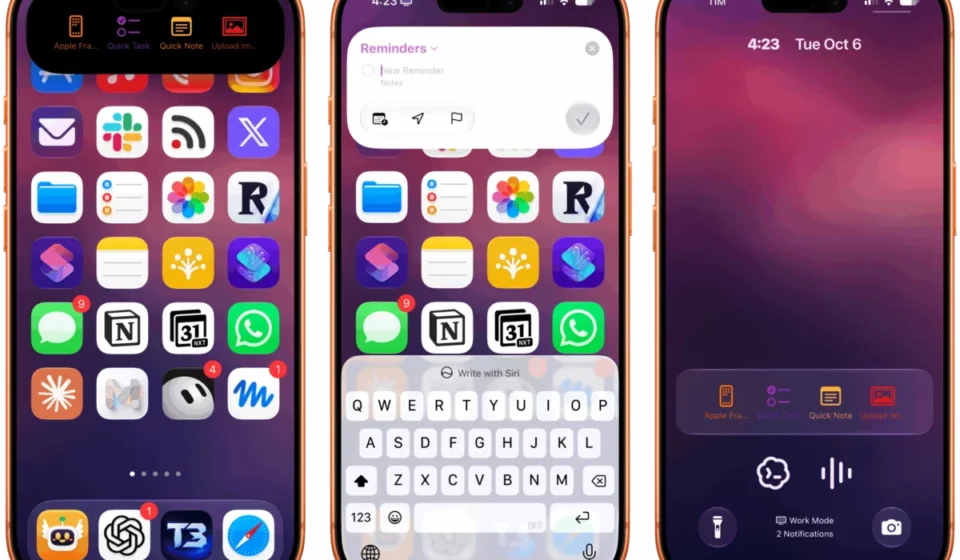
Deflector Offers a Novel Approach to Launching Shortcuts via Dynamic Island and Live Activities

The latest advancements in iOS and iPadOS 27 have unlocked innovative ways for users to interact with their devices, particularly through the enhanced capabilities of the Shortcuts app. One of the most intriguing additions for power users is the introduction of automation triggers that respond to push notifications. This feature allows for the creation of highly personalized workflows, enabling specific actions to be executed automatically whenever a notification from a designated app, with a particular title or body text, arrives on an iPhone or iPad. Building upon this powerful foundation, a new free utility named Deflector, developed by indie developer Cizzuk Shihu, has emerged, offering a remarkably clever and user-friendly method for launching shortcuts directly from the Dynamic Island or a Lock Screen Live Activity, bypassing the need to open the Shortcuts app itself.
The core innovation of Deflector lies in its ingenious utilization of the new notification-based automation triggers. While the concept of embedding shortcut launchers within Live Activities is not entirely new, previous solutions typically relied on the Shortcuts URL scheme. This method, while functional, necessitated opening the Shortcuts app, potentially disrupting the user’s current context and workflow. Deflector’s approach, however, is entirely self-contained within a Live Activity. When a user taps a shortcut displayed in the Deflector Live Activity, the shortcut executes immediately, mirroring the seamless experience of using a Home Screen widget. This bypasses the need for explicit app switching, providing a more fluid and immediate interaction with user-defined automations.
The Ingenious Mechanism Behind Deflector
The secret sauce behind Deflector’s seamless operation is its clever repurposing of the notification automation feature. Upon installation, Deflector prompts users to also install a companion shortcut, aptly named "Deflector Automation." This crucial component is designed to leverage the significant changes introduced in iOS and iPadOS 27 regarding automations. The "Deflector Automation" shortcut contains a shareable automation that users must enable. This automation is configured with a notification trigger that is designed to parse the content of incoming notifications. Crucially, this parsing allows the Shortcuts app to directly execute a specific shortcut using the native "Run Shortcut" action, a functionality that was not previously available through such an indirect method.
The magic truly unfolds when a user interacts with a shortcut listed within Deflector’s Live Activity. In this scenario, Deflector subtly sends a notification to itself. The body text of this "self-notification" contains the exact name of the shortcut the user wishes to run. These are not typical, visible notifications; they are silent and operate in the background, ensuring a discreet and unobtrusive user experience. Once this "self-notification" is received by the system, the associated "Deflector Automation" shortcut is triggered. The name of the desired shortcut, embedded within the notification’s body, is then passed to the "Run Shortcut" action, facilitating its immediate execution. This entire process happens without the need for any external URL schemes or complex inter-app communication, representing a significant simplification for users.
Functionality and Customization Options
Deflector’s functionality is elegantly straightforward. Users can configure the Live Activity to display a chosen number of shortcuts, offering a personalized selection of frequently used automations. Furthermore, the app provides extensive customization options for each displayed shortcut. Users can select an SF Symbol and a specific color to visually represent each shortcut within the Live Activity, enhancing both aesthetic appeal and quick identification.
The process of populating the Live Activity with shortcuts from a user’s library is also managed by the "Deflector Automation" shortcut. This automation employs an App Intent and the "Get My Shortcuts" action to efficiently retrieve and present the complete list of the user’s available shortcuts to Deflector. This retrieval process is remarkably swift, typically completed within a couple of seconds, a testament to the efficiency of the underlying API interactions. This method of fetching and presenting shortcut data is another novel implementation, showcasing the developer’s ability to push the boundaries of what’s possible with the new frameworks.
Potential Areas for Enhancement
While Deflector represents a significant leap forward in shortcut accessibility, there are a few areas where future optimizations could further enhance the user experience. One notable observation is a slight delay, approximately one second, between tapping a shortcut in the Live Activity and witnessing its execution on screen. This delay is likely attributable to the background processes involved in sending, delivering, and parsing the notification by the Shortcuts app. While minor, reducing this latency would further contribute to the feeling of instantaneous execution.
Another area for potential improvement lies in the renaming of launchers within the Dynamic Island. Currently, if a user customizes the name of a launcher, it can disrupt Deflector’s ability to locate a matching shortcut in their library. Allowing for custom renaming without breaking functionality would offer greater flexibility and personalization for users who prefer tailored labeling. These, however, are minor considerations in the context of a free utility that fundamentally redefines how shortcuts can be accessed.
Broader Implications and Developer Ingenuity
The existence and functionality of Deflector underscore a broader trend in the Apple ecosystem: the immense potential that lies within new APIs and frameworks when placed in the hands of creative and technically adept indie developers. Apple’s introduction of notification-based automation triggers for Shortcuts, a feature initially envisioned for specific app integrations, has been ingeniously repurposed by Cizzuk Shihu to create a completely unforeseen yet highly valuable user experience. This situation highlights how Apple’s developer tools can foster innovation beyond the company’s immediate intentions, leading to unexpected and delightful applications.
The ability to launch shortcuts directly from the Dynamic Island and Live Activities without launching the Shortcuts app itself has significant implications for productivity and device interaction. It allows for a more integrated and less intrusive way to access complex automations. For instance, users can now tie specific shortcuts to the physical Action button on iPhones or have readily available shortcuts for immediate tasks directly on their Lock Screen. This level of contextual access streamlines workflows and reduces the friction often associated with multi-step processes. The success of Deflector serves as a compelling example of how developers can identify and exploit novel use cases for emerging technologies, enriching the user experience in ways that even the platform provider may not have initially anticipated.
Historical Context of Shortcut Access
The evolution of accessing and launching shortcuts on iOS has been a journey marked by incremental improvements. Initially, shortcuts were primarily accessed through the Shortcuts app itself or via Siri. The introduction of Home Screen widgets provided a more direct visual access point, allowing users to pin frequently used shortcuts to their Home Screen for one-tap execution. However, these widgets still required a degree of intentionality – navigating to the Home Screen and locating the widget.
The advent of Live Activities on the Lock Screen and the Dynamic Island presented a new frontier for persistent on-screen information and interaction. Early attempts to integrate shortcut launching into these features, as mentioned, relied on the Shortcuts URL scheme. This method, while functional, involved a redirect that momentarily opened the Shortcuts app, breaking the flow. For example, a user might have set up a Live Activity that displayed a timer, and within that Live Activity, a button to "Stop Timer." Tapping this would typically open Shortcuts, which then executed the stop command. While functional, it was not as seamless as a direct execution.
Deflector’s approach, by leveraging the notification trigger, circumvents this redirect entirely. It effectively transforms the Live Activity into a direct launcher, similar to how a Home Screen widget functions, but with the added benefit of being persistently visible in either the Dynamic Island or on the Lock Screen. This represents a significant step towards truly contextual and immediate shortcut execution, making powerful automation more accessible and integrated into the daily user experience.
The Rise of Indie Innovation
The development of Deflector is a prime illustration of the vital role indie developers play in the Apple ecosystem. These developers often operate with a keen understanding of user needs and a willingness to explore unconventional applications of new technologies. Their agility allows them to quickly identify gaps in functionality or opportunities for novel experiences that might be overlooked in larger development cycles.
In the case of Deflector, Cizzuk Shihu has demonstrated a profound understanding of iOS and iPadOS 27’s capabilities, particularly the nuanced interaction between push notifications and the Shortcuts app. By recognizing the potential of the "Run Shortcut" action triggered by a parsed notification, Shihu has crafted a solution that is both technically impressive and remarkably user-friendly. The fact that Deflector is offered as a free utility further underscores the developer’s commitment to contributing to the community and pushing the boundaries of what’s possible on Apple’s platforms. This type of innovation is what keeps the iOS and iPadOS experience vibrant and ever-evolving, providing users with tools and functionalities that enhance their daily interactions with their devices.
Availability and Recommendation
Deflector is currently available as a free download on the App Store. For any user who regularly leverages the Shortcuts app to automate tasks or streamline workflows, this utility presents an opportunity to significantly enhance their productivity and device interaction. The ability to access and launch shortcuts with such immediate and contextual ease is a compelling proposition, making Deflector a highly recommended download for power users and enthusiasts alike. Its ingenious implementation and the valuable functionality it provides make it a standout example of innovative application development on the latest versions of iOS and iPadOS.